Assignment 5 – Your choice

Your final assignment asks you to draw on all the skills, insight and experience you have gained so far, by designing and producing a book of your choice. Use the following options to as a starting point or alternatively identify your own project.

● Influential book designers
Identify one or more book designers to present through your book. Find ways to develop your own creative responses to their ideas and visual approaches. Delve into their work, find suitable quotations, investigate their influences, and find ways of communicating this material, and your interpretation of it, to an audience through effective use of layout, narrative, and choices of material.

● Typography
Extend your exploration of typography by continuing to develop creative approaches to how typography, layout and your material choices can help generate meaning. Develop a book that explores one aspect of typography in more detail, or combines a variety of approaches. Just because your project explores typography it doesn’t mean you can’t also include images, colour and narrative.

● Found and altered books
Use an existing book as a creative starting point. This could be an extension of exploring altering books in some way, or as a research project into a specific book that will generate content and creative ideas for a new book. Find a physical book to work with or pick one of your influential books from Part One.

Research the subject in depth and think about the editorial structure (described in Part Three) of your book. What is the flow of the content, would you write articles or create imagery or both? What do you want to tell about the subject and how would you communicate this? And who is your audience? Make a flatplan before you start designing your book, and have a look at other books on the subject to see a different design approach on the subject. You may want to look at the work of designers you inspired by, in order to develop your own design approaches.

You may have identified an alternative area you wish to pursue. This is fine as long as you check this out with your tutor first and document the reason(s) for your choice.

Follow the creative design process in developing your creative thinking and how you will approach the workflow, in terms of content and timescale. Decide on your subject and start researching, creating content, editing content, making decisions about the materials you want to use, and designing your book. Frame this process within an overview of your workflow to help plan the production of your book. Planning the process of generating content, and how this can then be

developed, is key to successfully finishing a designed physical book. Keep notes to accompany the process of making of the book in your learning log, and reflect on your design process.

You can use any medium or materials you want to in the production of your book. You may want to research and explore hand-binding, or work digitally with print on demand for production. You may want to combine these approaches and you may want to consider whether you want to produce a one-off copy or a small edition. If you would like to use a particular paper for your book, make print proofs before printing the whole final book. Test the paper, the colours and how your design works on the paper.

Explore the materiality of books in more depth by considering the paper, printing and bookbinding of books, both as content and form. Think about how books are held, interacted with, and the associations of the materials you might use. Explore how these choices can start to create meaning within your book.

Reflection

Give yourself a final self assessment check against your assessment criteria to see how well you think you’ve done. Use this process to help reflect on your work and your achievements on the course as a while. It will also help to identify to you and your tutor any areas you may need to work on prior to submitting for assessment.

Sharing your work

Digital companies such as​ blurb.com​ have an online ‘sharing’ facility – this would be a useful way for your tutor to see the whole work without the need for expensive mail costs.

My choice

For my choice for the final assignment was an easy choice for me. I wanted to do something in and around typography, but I wasn’t initially sure which direction to take.

I started by mind-mapping a few things to se if anything jumped out at me.

I had so many directions to choose from when it came to typography. Should I use all or focus on just one? I started making some notes to see if that focused my thoughts a little better.

This actually confused the matter even more! I had given myself ‘too many’ choices of what to include in my book. I needed to hone my ideas down, as I thought that I needed to specialise.

As well as trying to find a niche for my book I began collecting some inspiration via Pinterest. I already had a well establish typography board to draw from, but I also started a layout board to collate images of interesting layouts or layout elements.

I also found this video on YouTube which I thought was fun.

Source: YouTube

After mulling over what direction to go in for this assignment I had managed to whittle it down to 3 ideas:

  • Different styles of type
  • Type designers
  • History of typography

I am fairly familiar with the different classifications of type, and I had done some work around type history in my previous module: Graphic Design Core Concepts. So this left type designers…..decision made.

So now I could write myself a brief…

Having a clear direction and an actual brief helped focus my ideas and I was able to begin the design process.

Design

Firstly I needed a list of designers. I hit the books and scoured the net to find a list of suspects. The most useful tool I found was my copy of ‘A Visual History of Type by Paul McNeil‘. It covers 320 of the most influential typefaces of the last 500+ years.

Source: gilburtandpaul.co.uk

I worked my way through the book and picked out some of the typefaces that I personally thought were important and listed who designed them.

A couple of the typefaces I had chosen didn’t have specific designers which was a little disappointing and some of the designers had very little information about them. I wrote these off with one exception: Akzidenz Grotesk which was the basis for Helvetica, which was too important not to include.

I eventually got the list down to 18 designers:

  • Johannes Gutenberg – Gutenberg
  • William Caxton – Caxton
  • Claude Garamond – Garamond
  • John Baskerville – Baskerville
  • Firmin Didot – Didot
  • Giambattista Bodoni – Bodoni
  • Robert Besley – Clarendon
  • Berthold Akzidenz – Akzidenz Grotesk
  • Morris Fuller-Benton – Franklin Gothic
  • Paul Renner – Futura
  • Eric Gill – Gill Sans
  • Stanley Morrison – Times New Roman
  • Howard Kettler – Courier
  • Max Miedinger – Helvetica
  • Jan Tschichold – Sabon
  • Carol Twombley – Myriad
  • Eric Spikermann – FF Meta
  • Tobias Frere-Jones – Gotham

My 18 designers fitted neatly into 6 time periods(by design) which were to be my 6 chapters. Technically this was only 18 pages unless they were all to be double-page spreads. This needed some more thought.

I decided to move on to the format of the book. What type of book would this be? Referring back to the brief, I had identified the audience as people who would specifically be interested in typography and its history. Therefore, I felt that the book would be some sort of coffee table read with a high-end feel, something that people would want to pick up and browse through. It had to be tactile and eye-catching. This would be achieved by the choice of finishes for the book.

I had started to sketch out page layouts in a traditional portrait format based on my Pinterest research.

However, the more I sketch, the less I felt the format worked. I felt the book would work better in landscape format as this gave a larger overall width to the spreads which would carry the information better.

I drew up a flatplan consisting of 36 pages to start with, which gave me a double page spread for each designer.

I added a cover and back cover. I then realised I needed to think about the inside cover and contents/index etc..

I din’t really want to go over the 40-page mark, so I made the decision to give my designers a single page rather than a spread.

This didn’t really work, as the page count wasn’t enough.

I laid out a 36-page document in InDesign to see if it made more sense. I set the document up as 36 facing pages with an outside, top and bottom margins of 15.4mm and an inner margin of 40mm. I lated out the page with 8 columns with an 8.5mm gutter. Also, as a matter of process, I set up a rich black colour in the swatches menu as this gives a better result when printed than the default black. The settings were: C25 M25 Y25 K100.

In response to the part of the typography unit about grids, I decided to use the same grid/column structure for each page and demonstrate how type could be laid out in different ways using just one grid. I started with just one page, and my first designer.

I found an image of Johannes Gutenberg on Wikipedia and began with that.

File:Gutenberg.jpg
Source: Wikipedia

I placed the image on the page and added some filler-type to try and get the layout right. I also added a title and page number. I needed to decide what typeface or faces to use for this publication.

I wanted to create contrast in the book and wanted to use typefaces that would do this. I wanted to use both serif and sans-serif typefaces to achieve maximum contrast and began with one of the typefaces that was a possibility in my initial stages of research: DIN 1451. This was discounted as one of my subjects as there was no evidence of who created it, but I liked it as a minimal, no nonsense, German sans-serif. I used this as my headline on the page in all caps to identify the designers.

Next came the page numbers. Rather than straight forward numbers, I wanted the pages to have classical numbering and used Roman numerals. These would look better in a serif typeface and for this I chose IKANSEEYOUALL by Swiss Typefaces which has a high-contrast of stroke width.

For the body I chose Helvetica Neue as this was a modern, easily readable typeface. To create even more contrast, and building on the Good/Bad Typography exercise, I wanted to use the same typeface in different sizes and weights.

Once I’d laid it all out on the page using the grid, I realised it was a little monochrome. I decided to add some red. I changed the page numbers to red and added an underline covering the width of one column. I then added the designer’s initial as a red overlay on the image in DIN 1451 to mirror the title.

Once I had the basis for the first page layout, I went on to create variations for the other 17 designers I had chosen. I decided to keep the image in the same position on all of the pages as well as the title and page number, these elements were added to the master-page so that the layout would repeat throughout the book. Any images that weren’t black and white I took into Photoshop and desaturated and changed the contrast to fit with the non-photographic images.

As I had divided my designers into 6 chapters of 3, I needed to set up a contents page and clearly define the chapters.

I started with defining the chapters by inserting whole-page dividers with over-sized numbers indicating the different chapters. These were again done using DIN 1451 reversed in white out of a rich-black background.

I then needed to sort the contents page. I did this as a double-page spread and used the over-sized type to write the word ‘contents’ across the spread and lowered the opacity so that I could then write the contents over the top. I did this by numbering the chapters using IKANSEEYOUALL and then I had to decide on titles for my chapters that I then labelled in Helvetica Neue. I confined these to single columns and hyphenated the all-caps chapter titles that I had named:

  • Originators
  • Timeless
  • Distinctive
  • Groundbreaking
  • Modernity
  • Digital.

I now needed a cover. During my research of designers, I came across Saul Bass’ famous quote of “Design is thinking made visible” and decided to use a variation for my book title. I used ‘Thinking Made Visible’ as my book title and added the subheading of ‘The Art of the Type Designer’. I again used DIN as my typeface of choice, but this time I outlined it and lowered its opacity but gave the word ‘visible’ a gradient to make it look as if it was becoming more visible. The subheading was given the same opacity as the title and Helvetica was used.

I found another quote which I wanted to use on the back cover. I didn’t want to mess with it this time and just used it as is with some hanging punctuation, reversed out of the back cover.

I now had my page layouts, my covers and contents. Now all I had to do was to write the content!!!

I had calculated with by using the placeholder type that I needed 200 – 300 words of type for each designer. This was going to be a daunting task. Using the book I mentioned earlier and the internet I began researching my designers. This was much harder than designing the book itself. After I had collated the type for the first 9 of my designers I was relieved to be halfway through. This prompted me to create a double-page spread with the word ‘half.’ written across it in IKANSEEYOUALL, in the red that I’d used earlier.

This led me to produce another spread with the word ‘full.’ at the end of the book. The book didn’t seem balanced. It needed another similar spread at the front of the book, so I added a spread to the front of the book with the word ‘type’ across the spread.

I felt that the book was lacking context. It needed an explanation as to the meaning behind the book. I decided to add a summary section…more writing! I managed to write a few more words to summarise the development of type design over the last 500+ years.

This, again, was reversed out of a black background. The type needed a little more spacing for these to help with the legibility of the paragraphs, as white type appears larger than its black counterpart so the leading and line height need to be larger.

It also gave me the opportunity to add the information about the typefaces used in the book. This seemed to make the book more cohesive. I went on to mock it up.

Now I had to prepare it for print. I had set up my document with a 3mm bleed, which is pretty standard. I had to make sure all my images were linked correctly and at the correct dpi and all colour were CMYK.

I had decided to use Mixam as my printer of choice due to Covid restrictions and they require pdfs to be uploaded as seperate pages which meant my spreads needed to be separated and an extra bleed added to the inner edge. Another point made by a fellow student, that was confirmed by the printers, was that if I was planning to perfect-bind my book, that any ‘read-across’ elements of my book would need to allow for binding to make them legible. This meant that I need to add an extra 4mm to the inner edge of the affected pages, namely the large, single word spreads and the contents page. The printer suggested that I print out the pages at full size with crop marks with the 4mm added and then fold along the 4mm line and then see it the type meets and is continuous across the spread.

Taking into account the crossover.

The printers were very helpful and communicated with me with any problems and offered lots of useful advice.

I had opted to print the book on 150gsm silk paper with a 250gsm silk cover with a matt lamination to be perfect bound. I felt that the pages would be thick enough at 150gsm and the matt laminate would give the book a high-class feel. The cost for a print run of just 3 copies was approximately £30.

The printers turned the job around in less than a week and I received 6 copies of the book instead of 3. I was amazed at the quality and finish of the book and the time that they took to produce.

The final printed book

Reflection

I really enjoyed this last assignment. It was good to go through the whole process of designing a book and following through to dealing with printers and having the physical book in hand.

I really like the design and feel that I fulfilled the self-defined brief. It has a classy look and feel and I think it would appeal to the target audience. I think that the book has a defined form and function, but also has an element of fun within it. It would make a good coffee table book.

Over the course of the assignment I have explored typography, grid use, layout design, curating images, material choices, finishes and the print process. I feel that using the body type to demonstrate different layouts on the same grid worked really well and showed the flexible possibilities even in the confines of 8 columns.

I have used a vast amount of online and offline research for both the design process, the content writing and the print process. It was a daunting task, but I actually enjoyed the process. Filling the roles of both designer and copywriter gave me a lot of creative freedom in how the book layout worked. I had the ability to fit the content to the design, rather than having pre-written content that couldn’t be edited to fit.

The print process was an area that I didn’t know too much about. This exercise gave me the chance to find out more in regards to what a printer requires from me as the designer and things to bear in mind when designing layouts, such as crossovers(where images or type cross over facing pages on a spread). Having direct contact with the printer and having this explained clearly was invalid.

References

Images

Johannes Gutenberg – Wikipedia.com
William Caxton – Britannica.com
Claude Garamond – WordPress.com
John Baskerville – WordPress.com
Firmin Didot – Pinterest.com
Giambattista Bodoni – Museobodoniano.com
Robert Besley – Pinterest.com
Herman Berthold – Bahoe.de
Morris Fuller-Benton – morrisbenton.com
Paul Renner – Pinterest.com
Eric Gill – alchetron.com
Stanley Morrison – Twitter.com
Howard Kettler – comarts.com
Max Miedinger – Pinterest.com
Jan Tschichold – WordPress.com
Eric Spiekermann – edenspikermann.com
Carol Twombley – Pinterest.com
Tobias Frere-Jones – frerejones.com

Books

A Visual History of Type by Paul McNeil
Production for Graphic Designers by Alan Pipes

Websites

famousgraphicdesigners.com
typewolf.com
Pinterest.com

Sequencing Images

In this exercise you’re going to create images which you’ll then print onto the papers you collected in the first exercise. You have been working with the poem Tango With Cows​ in the exercise ‘Concrete Poetry’, to create an experimental text. Using your interpretation of the poem as a starting point, develop a set of images that you can sequence into a narrative. You can choose to create these images yourself or use existing images.

Idea generation

Create a series of images which will build a narrative sequence over about 16 pages.

Use keywords from the poem as a starting point. Work with images you have created before, developing and changing their contents, or use fresh new ideas and imagery related to the poem. Remind yourself of the creative design process.

Explore the sequential narrative over the folds. Produce a folding document (2 sided) with the images you have created. Try one of the folding systems discussed in part two of the course, Form and Function: Paper folding.

Research and development

A visual narrative is a way of communicating some form of ‘story’. It may be that you interpret ‘narrative’ in a conventional way, using chronological images of how your identity has changed over time, with a beginning, middle and an end. Or perhaps you’ll work in a less obvious way, exploring how your images can be exploited through abstraction and print processes, using the term ‘narrative’ as a vehicle on which to hang your concept of the poem.

The purpose is to interpret the brief to create images that are meaningful to you, plus extend your understanding of image qualities. These images may be paintings, photographs, drawings, film stills – they can be at any scale, in any media and about whatever you want them to be, in the context of exploring the concept of the poem. This is your opportunity to explore some of the features of digital imaging software, such as Photoshop, to layer images, cut out images, experiment with opacity, filters, hue, brightness, contrast and halftone screens, among other things.

For example, can we approach text as image? What happens if you ‘rasterize’ text, then begin to manipulate it, in the same way as you would montage image material. Be creative! Explore!

Remember you have access to Bridgeman and Oxford art libraries online also, if you want to download images and work in this way, but originating your own images will make the project more personal to you.

Design

For this exercise I started by picking out a few of the key phrases from the poem.

I ended up with picking out 10 hey phrases that stood out. I had some ideas for some of the phrases but others needed some work.

The first phrase that I had an idea for was “Or better still – we’ll get a record player. Well, to hell with you!”. The idea was to have a vinyl record being engulfed in the flames of Hell.

This was achieved by layering different sized images of flames in front and behind the record which colour was altered to reflect the colours of the flames. I also desaturated some of the flames to give the impression of smoke. I was happy with the resulting image and thought it was a good starting point. Upon returning to the poem and re-reading it, it occurred to me that the punctuation of the poem meant that it the part about the record player and the flames of Hell were two separate parts and didn’t relate to one another directly. So I went back to the drawing board.

I moved on to the phrase “Perhaps we’ll drink a glass of wine to the health of comets”. I couldn’t quite get my initial idea of a comet in a glass of wine right. I decided to simplify the idea and used an image of a raised glass desaturated and cut out placed on top of a saturated image of a comet streaking across the sky. I also tried multiple raised glasses of different scales and angles but this didn’t work as well as the single glass. I liked the way the cutout glass sat on the colour image, there was something Terry Gilliam about the image.

I was happy with this and moved on to my next image. “kings of orange groves
and cattle” was an image I toyed with for a while. Which was the dominant word in the phrase? What needed emphasising the most? I couldn’t decide, but I knew that orange would be the dominant colour in this particular image. I tried looking for images of orange groves that would inspire me but couldn’t find anything. I then came across an image of just some oranges…

I had the comedic idea a to insert cows in between the oranges wearing crowns, a little surreal I know!

This made me and my peers laugh, so that decided it…it was in.

The next phrase was “…and to build bridges from the tears of bovine jealousy to the tears of crimson girls”. I decided to split this phrase into 2, the crimson girls and the bovine tears. I started with the ‘crimson girls’ half of the phrase and used an image of a tearful woman which I desaturated and overlaid a crimson red filter. I then used an image of a bridge which I laid over the top and used a gradient to mask some of the image so that the crimson woman showed through.

The next phrase was the easiest to put into pictures. “With tinned mirth…” was an obvious one and just required some type manipulation and the addition of some highlights to make make it look more realistic.

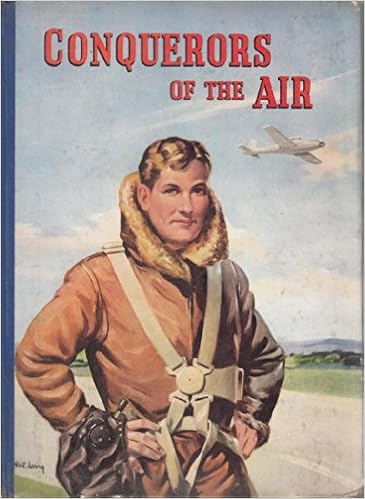
Next was “…conquerors of the air…”. There is a book called Conquerors of the Air by Harry Harper.

Source: Amazon

This made me think of the Communist propaganda posters showing off their supremacy. I started with the type and used a font called DDC Hardware from Aaron Draplin which has a utilitarian look and feel. I replaced the Q of the word conquerors with the hammer and sickle and stacked the type. I set the type on top of a communist propaganda poster displaying air power which I overlaid with a red filter. I still wasn’t happy with the design so I added another layer on top which was the blueprints of the Russian MIG-25 aircraft and added a paper texture to make it look like a poster.

I was really starting to enjoy this form of creating imagery from a piece of text.

The phrase “Well, to hell with you! hornless and ironed!” lead me to rethink my original ‘record player hell’ due to misinterpreting the punctuation. The ‘hornless and ironed’ part of the phrase conjured up the image of a cowhide rug. I found an image of a cowhide being tanned. This coupled with an image of some lava gives a dramatic and interesting result.

Next up was the first line of the poem, “Life is shorter than the squeal of a sparrow”. I had the idea of giving this the look of some of the propaganda posters I had seen, a call to arms. I used a desaturated image of a sparrow and added geometric lines and shapes to make it look as the sparrow was ‘squealing’. Rather than using the actual word squeal, I translated the word into the Cyrillic alphabet to give it more of a Russian feel and a nod to the poem’s origins.

I thought that this would make a very good and powerful cover for the book.

7 down, 3 to go. I decided to return to the record player line, this time without the fires of hell! Again I wanted to give it a propaganda look, but this time a little more modern. Using black and white imagery of a retro record player and a strong geometric background I gave it more of a retro look by changing the whites to a faded cream colour. This gave it a softer look but there was still too much whitespace. I then added one of the cows from the ‘oranges’ image which gave it a more quirky look but worked very well. There was still too much space around the image so I added the description of a record player from Google Dictionary in the DDC font I used earlier.

Onto the other half of the phrase “…and to build bridges from the tears of bovine jealousy”. For this image I didn’t want it to be in the same style of the other half of the phrase. I started with the colour green as this was associated with jealousy. I used an image of a bridge with the water underneath substituted with a green overlay. I then needed a crying cow which I gave green overlaid tears. this somehow didn’t look right until I added a green circle in the centre of the image, over the cow’s eyes.

I couldn’t finish the series of images without visualising the tile of the poem which is also used in the line “I want one – to dance one tango with cows…”. I began with an image of some ballroom dancers which I substituted the heads with those of cows. I then placed these into and image of some farmland and a barn. The image of the dancers seemed quite traditional in nature as opposed to the modernist nature of the poem. I decided to embrace the contrast and used a filter to give the image a more classical painted look.

Now I had my images. I wanted to put it on a concertina-fold book with 5 images on each side. I just had to decide the order in which they appeared. Do they need to be in linear order or would a more disjointed approach work?

I drew a flat-plan to help me envisage what order the images needed to be on the book.

This was harder than I thought and took a while to get my head around. I knew which images would be my front and back covers, but getting them in the right sequence needed thinking about to make sure when the book was folded they would be in the correct positions. As for the rest of the images, I decided to randomise the order as I thought that they could be treated as individual images as well as one poem.

All images used are available at https://pixabay.com https://unsplash.com https://www.freepik.com and https://www.pexels.com unless otherwise stated.

Reflection

It took me a while to get into this exercise, it stumped me for a while. But once I had found a starting point the creative juices began to flow. It also gave me a chance to re-familiarise myself with Photoshop which I hadn’t used for a while. I enjoyed manipulating and layering the images and also injecting some humour into the imagery. I feel that I have given the poem a modern twist while using the imagery to nod to its communist/modernist roots.

Concrete Poetry

Concrete poetry, sometimes referred to as visual poetry, is a form of experimental typography where the use of letter and word arrangements enhance the meaning of a poem. The typographic treatment of words within concrete poetry starts to add additional resonances through their scale, placement, overlay and styling, suggesting new ways to see and say the poem.
Early examples of concrete poetry were by artists such as Kurt Schwitters and Vasily Kamensky. The development of experimental typography flourished during the 1950s and 1960s with artists such as Dom Sylvester Houédard, Ian Hamilton Finlay and Carl André. Often letterpress and the typewriter were used for experimental typography during this period.

“Inspired by the pioneering work of Mallarmé, Apollinaire, the ‘zaum’ poets, Futurism, Dada, and drawing on the more recent example of Lettrism, the central focus of Concrete Poetry was on the written word as a visual phenomenon. Typography was therefore a central concern, with letterform, weight, scale and page layout all contributing
to the meaning of the work.”

Simon Morley, Writing on the wall: word and image in modern art, 2003. London: Thames
& Hudson.

“Generally speaking the material of the concrete poem is language: words reduced to their elements of letters (to see) syllables (to hear). Some concrete poets stay with whole words. Others find fragments of letters or individual speech sounds more suited to their needs. The
essential is reduced language. The degree of reduction varies from poet to poet, from poem to poem.”

Mary Ellen Solt, Concrete Poetry: A World View, 1968. Indiana University Press.

Critical writing task

Identify an example of concrete poetry and write a short critique of the content, design and the relationship between the content and form. How has the use of typography, layout, and space been employed to help generate meaning? Print out a copy of the poem and add notes directly onto the page. Write a brief summary of your thoughts, feelings and reflections on how concrete poetry creates new meanings.

As a starting point you may want to look at the following artists who practiced Concrete Poetry:

● Dieter Roth
● Max Bense
● Eugen Gomringer
● Ian Hamilton Finlay
● Henri Chopin
● Öyvind Fahlström
● Emmett Williams
● Geraldine Monk
● Mary Ellen Solt
● Ilse Garnier

To explore concrete poetry in more depth you may want to read Mary Ellen Solt’s 1968 Concrete Poetry: A World View, available via UBU:
http://www.ubu.com/papers/solt/
Or research the work of individual visual poets at UBU:
http://www.ubu.com/vp/

Visual task

Use one typeface to create a playful design for the Tango with Cows, 1914, by Russian Futurist Vasily Kamensky (poem shown below). Explore and experiment with the relationship between the meaning of the text and the form you present it. Think about what kind of typeface you choose as well, does it reflect the content of the text? How does the paper relate to the design? Decide on an appropriate scale and format for this page. Create a series of sketches and ideas, and chose one to develop into your final design. Print your design on one of the papers you have collected in the previous exercise

Poem: Tango With Cows

Life is shorter than the squeal of a sparrow.
Like a dog, regardless, sailing on an ice floe down the river in spring?
With tinned mirth
we look at our destiny.
We – the discoverers of countries
conquerors of the air
kings of orange groves
and cattle.
Perhaps we will drink
a glass of wine
to the health of the comets,
expiring diamond blood.
Or better still – we’ll get a record player.
Well, to hell with you!
hornless and ironed!
I want one – to dance one
tango with cows
and to build bridges
from the tears
of bovine jealousy
to the tears
of crimson girls.

Write a short paragraph reflecting on the relationship between the form and content of your design in your learning log.

Critical writing task

Concrete poetry is a new concept to me, I had not heard the term before and needed to do some research on the subject before I started.

Concrete poetrynoun

Poetry in which the meaning or effect is conveyed partly or wholly by visual means, using patterns of words or letters and other typographical devices.

Researching concrete poetry led me to see that in the previous exercise: Experimental Typography I had created something similar to concrete poetry for the Jules Verne passage in manipulating the text to look like water or the sea monster to help illustrate the type instead of simply reading it.

I found a piece I liked that was similar to what I had created in the above exercise.

Source: The Type Bar

Here the artist has just used a typewriter to create the type but has emphasised parts of the type by typing over the top giving the image depth and a three dimensional feel depicting the ‘gravitational waves’ of the piece. It gives form to something that is normally invisible to the human eye and hints at their repetitive nature. The large are of whitespace around the type helps draw the eye to the type and tweaks the reader’s curiosity as to what the piece is about. The pice looks very textural due both to its design and the paper it is printed on. I personally think that this piece is very architectural, each line built on top of the other with just the right amount of characters to form the geometric shape. To enable the piece to fit its shape there is a letter missing. On the third line from the bottom, the last word should be ‘for’ but the ‘r’ is missing. This is probably to enable the artist to evenly distribute the type within the confines of the rectangle.

Another piece I thought was clever is this one by John Cage which is held by the Museum of Modern Art.

Source: moma

It took me a while to see the significance of the layout. The paragraphs are all aligned along a central axis where vertically the letters read ‘Mary Sisler’ 3 times which is the name of the woman to which the letter meant for. The names are in a slightly larger font size to the rest of the letters to emphasise amongst all the other capitalised type. The larger font however bleeds into the lines above and below due to the line height being fixed for the smaller type but this does give a feeling of closeness and fondness for the letter’s recipient. I think that this a very clever piece. It doesn’t necessarily depict anything in particular but it is very well worked out and is visually interesting and makes you look twice at the piece.

Reflection

As I have said above, Concrete Poetry was a new term I had not heard before. I really like the way it can be used in so many differing was to depict elements of a piece of type such as movement, rhythm, feelings. It can give form to words or pieces of text to help tell a story which wouldn’t normally evident when seeing the poem/type written normally on a flat piece of paper. New meaning can be created by adding emphasis to a word or letter through the use of capitals, spacing, repetition, punctuation, deliberate misspelling or scale.

Concrete poetry definitely adds impact to the written word as well as a new dimension of engagement, whether that is through touch, as many concrete poems take on a tactile, three dimensional form, or through ‘sound’ as although there is no sound the creation of rhythm through spacing and the emphasis of the sounds and volume of certain words means that the brain can add these attributes as you are reading it.

Visual task

To start, I need to know more about the poem ‘Tango with Cows’.

Source: Designer Daily

Tango With Cows: Ferro-Concrete Poems is an artists’ book by the Russian Futurist poet Vasily Kamensky published in Moscow in 1914 with a print-run of only 300 copies. Tango with Cows is also the name of a poem contained within the book. The book contains 14 pieces of Ferro-Concrete Poetry in total, 8 of which are poems that use multiple fonts and unusual spacings to express sounds and textures, with the remaining 6 being of diagonal grids representing maps, floor-plans and aerial views said to be a nod to Kamensky’s role as an aviator.

The poem Tango with Cows is a look at how concrete was changing the face of urban Moscow and used the words and letters of the poem to represent the dynamism of the changing cityscape. It is printed on cheap wallpaper which is said to be a parody of urban bourgeois taste in that they nouveau-riche bought cheap commercial printed wallpaper to appear wealthier than they were. Kamensky used it here instead of printing paper as it was actually cheaper. The poem is also a commentary on the tension developing between the modernity influencing Russia’s cities and the want to hark back to the country’s rural past. There is also a nod to the dance craze influencing the urban socialites of Moscow ‘Urban Tango’. The ‘Urban Tango’ was a racy Parisian dance that reached Russia in 1913, bringing with it a perceived threat to traditional values and the rural way of life due to its sexual connotations, closeness of the dance partners and association with brothels and night clubs. By juxtaposing the urban tango with the cows of rural Russia, Kamensky captured the tension poets and artists felt between the recovery of a rural past and the allure of an urban present in creating their art of the future.

Initial ideas

I started by mind-mapping my initial thoughts on what jumped out from my research. I hadn’t even studied the content of the of the actual poem yet, these were just my thought about the history of the piece.

So I thought I’d better take a look at the content of the poem and make a list of the words that could possibly be illustrated by manipulating the type.

  • Shorter
  • Sqeal
  • Sailing
  • River
  • We
  • Discoverers
  • Conquerers
  • cattle
  • glass of wine
  • comets
  • diamond blood
  • record player
  • hell
  • hornless
  • ironed
  • tango
  • bridges
  • tears
  • crimson girls

These were the words that I thought had the best possibilities to create imagery with. As well as starting to look at the wordplay of the list above, I started to look for some visual inspiration. I began looking at other examples of Concrete Poetry for inspiration as well as things that had come up in my brainstorming. I added these ideas to my Pinterest board.

I also started to look for a suitable typeface/font in which to create my design and had a look at what I’d got in my collection as well as suitable ones I found on the internet.

As I wasn’t sure which direction my design was going to take I wasn’t sure on the type-style to go for. However, I did know that I didn’t want to be too cliché with the choice, so the faux-Russian(Cyrillic) typefaces were confined to the trash.

During my research I came across a couple of pages of a Russian book from 1928, which I know is a little later than the poem, but I liked the design.

Александр Безыменский. Комсомолия. 1928
Source

I have no idea what the book is about but I did like the style of printing with use of minimal colour and overprinting. I wondered if I could do something similar.

At this point I was feeling very uninspired and was banging my head against a brick wall!

I went back over my research and took another look at what I’d highlighted and to see if anything new jumped out at me. Rather than looking at individual words I began to look at the poem as a whole and its rhythm. What was the poem in its simplest form? It was about a metaphorical dance, an Argentine tango. Could I use this as a base for my design? Could the rhythm and the feel of a dance be used to depict the poem? I started to research the dance and there was lots of imagery of the raunchiness of the dance but there were also diagrams of the steps, instructions on how to do it. I thought that this could be a good starting point for the design…but where to start?

It took me a long time to find inspiration to start the design process, my mind kept drawing a blank! I then stumbled on the diagram below of the steps involved in the Argentine Tango.

Google Image Result
Source: https://skatedancediagrams.weebly.com/argentine-tango.html

This was different from previous diagrams that I’d seen as it seemed more technical and didn’t have the footprints, not that I had any idea what it meant!

Google Image Result
Source: https://passionatadance.com/pds/2013/05/argentine-tango-the-embrace-walking-and-salida/

The design

After sleeping on the idea of using the diagram as a basis for my design I had formulated a plan of what it would look like and how I would go about it.

Initially I imported the diagram into Illustrator to use as a guide. I then traced the 3 main lines relating to the movement of the dancers. I kept the dashed line to keep the instructional essence of the diagram and the 2 curvy lines that showed the movement and discarded the rest.

The curvy lines I used as a base on which to type some elements of the poem. I used some of the lines to as a nod to the original dance steps along the curved lines. The typeface I chose to do this was Chandler42 which is a typewriter-style typeface that has a mixture of weights that I thought would work well for this design. It also gave a utilitarian look to the type which I thought echoed some of the Concrete Poetry I’d seen and also a nod to the communist state and its distressed look gave an edgy, urban feel.

Chandler42 Lite

I began to emphasise certain words in the text that I felt were important by changing their size, weight and style. I also illustrated some of the words with type that I had highlighted earlier in my research e.g.: ‘shorter’ had its tracking narrowed; ‘down’ was dropped below the baseline; ‘comets’ was made to look like a comet; ‘hell’ is upside-down. I also thought that the serifs on the uppercase V and W in ‘bovine’ and ‘cows’ looked like horns, so these were emphasised too. Even though it isn’t the start of the poem, I thought the ‘We’ at the start of the 5th line was quite important as I felt it referred to the communist state again, which is why it’s the largest type element on the page.

I put the type elements on a angle reflecting some of the propaganda posters I had researched.

After all the fuss of not knowing where to start I was happy with the way that this had turned out. It was unusual in its design but I felt it gave an element of rhythm to the piece with certain words being given individual treatments to emphasise their characteristics or importance.

With the paper choice for this piece, I wanted to give it that utilitarian look and the thing that sprang to mind was newspaper. This was the paper of the masses and I thought would be appropriate for this genre of poetry. The design was quite type-heavy and would struggle to be read on ‘fresh’ newspaper, but a faded, old newspaper would work. So I found an old Russian newspaper from 1906 to use as a background.

russian newspaper 1900's - Google Search
Source: google.com.au

I then used a texture to give it an aged appearance and took the opacity down. I wanted to add some more overprint elements as mentioned earlier so I added some communist propaganda elements on top of the paper giving it a Letterpress print look.

This is the final design

Reflection

I found this exercise very challenging in that I struggled to find a stating point. I am definitely way out of my comfort zone with this but hopefully I have managed to produce something interesting and evoking that does the original poem justice. Once I had found a way to relate to the poem visually I found it much easier to relate to the style of Concrete Poetry. I will be looking into Concrete Poetry further as this is another typographical approach to design that I find very clever.

Assignment Three: My Little Book of…

The brief: Create two books explaining and exploring the typographic and layout principles you have researched in this section.

Book 1: My Little Book of…Good Typography
Using the reference material that you’ve gathered throughout the exercises and research tasks in Part Three, design a book which explores traditional ‘good practice’ in typography. What is readability and, as a designer, how can you aid it? Visually explain the typographic principles that we’ve touched on in Part Three, such as type size, leading and line length. For example, you could demonstrate kerning by creating a page which looks at letter combinations applying this principle. Equally, explore good layouts and use of grids to help support and frame your typography. This is an opportunity to develop carefully considered
design layouts that feel easy and engaging to read and look at. Be creative in how you do this, developing a range of options and possibilities. Show off your good typography skills as well as talking about what makes good typography in your text. To support this, find quotes and type rules by other typographers and designers – perhaps revisit your research into book designers from part two. Find examples of good typography within book design you can present and talk about. Your booklet should be a celebration of good typography, whatever you think that is.

Book 2: My Little Book of…Bad Typography
The rules surrounding what constitutes ‘good’ typography are entrenched in tradition and convention, as you demonstrated in Book 1. Having looked at ‘the rules’ surrounding readability and legibility now is your opportunity to break them! Be inventive and experimental in how you explore what might constitute ‘bad’ typography. For example, negative leading, too-long line length and ‘inappropriate’ application of typographic principles may produce visually jarring and uncomfortable results. What does ‘bad typography’ mean to you and how might it manifest itself? Express your ideas in a visually imaginative way within your second book. This is an opportunity to be playful and push your design layouts, typography and ideas to the limits – celebrate bad typography through
your designs and content. Again, find quotations you can work with or examples of bad typography to draw on.

Your books should each take the form of a simple eight-page booklet – folded, stapled or stitched. Design the cover and contents for each. When creating your content for both books, be aware of your audience, and how you might want them to engage with your content.
While both these books are about typography, make sure you also include images within the text. These could be your own illustrations, photographs, or stand-alone typography pieces that accompany your text.
Use a flatplan to organise your content and indicate where important text and images occur, on a recto (right-hand) or verso (left-hand) page, or as a double-page spread. Suggest images by a crossed box, as in the example for ‘front cover’ in the diagram on the previous page. These crossed rectangles indicate image boxes in desktop publishing (DTP) software and are used in drafts and sketches to signify image material. There is no need to go into detailed drawing regarding text or image material at this stage. Text can be indicated by a series of thick horizontal lines, with main headings sketched in. Use the flatplan to familiarise yourself with the structure of a booklet. Note the blank pages and how they are organised to complement the preceding or following page. Note the extent (number of pages) in the book and whether it has been printed in signatures or sections.

As with previous assignments, see this as an opportunity to undertake a creative project that is more circular in nature than linear. Visualise initial ideas, assess them and return to your starting point to develop new starting points. Be experimental with your typography and take creative risks along the way. Focus on how you can visually document your creative journey as well as your reflections on what you are producing.
Your notes should cover why you decided to portray what you did, what you included and what you omitted. Reflect on how do you feel about the two completed books. For example, are there comparisons you can make between them, have any interesting design issues emerged through the process of making them?

What?

Primary Research

Typography Rules

I wanted to create a book that would be like a go to book for a little inspiration and advice. Something that could be carried around in your pocket and used for quick reference. So, using the layout of an 8 page booklet this would give me a front cover, a back cover and 3 spreads in between. This would mean that I could use 3 typographic rules for the interior of the book which could be elaborated upon within each spread. So I came up with a list of rules to adhere to when designing anything typographical.

  • Contrast is King
  • Skip a weight
  • Double your point size
  • Too many typefaces
  • Kerning; leading; tracking
  • Using the grid
  • Breaking the grid
  • Widows and orphans
  • Alignment

I was not sure that I would use all of these rules as they may not all fit or work in my design.

Quotes

Which quotes to use? There are so many out there but which are appropriate to this particular assignment. I decided that I would stick to the classics of Müller-Brockmann and Vignelli as these were the ‘fathers’ of modern typography and layout. However, I would have to find the right ones.

Secondary Research

Dimensions

As I have mentioned above, I wanted these books to be pocket reference books that could be easily carried around and referred to quickly.

Looking back at the research into book sizing in the last assignment I thought that even B5 was too large to slip into a pocket easily.

Source: Imprintdigital.com

So I decided that the books would use the width dimension of a B5 book and this would be replicated for the height giving a square book with the dimensions of 176mm x 176mm. Would this still be too big to fit in a pocket? I thought it was still a bit too big, so I reduced the size to 129mm square.

Papers

To give these books a more robust format I thought that they would need to be at least 250gsm thick stock and given some sort of coating to protect the books giving them a better longevity. Using the sample book from Solopress I thought that maybe a gloss or silk finish would help protect the books. I needed to have a look at some other booklets/leaflets to see other examples.

Initial ideas

So I scribbled down some initial ideas in my sketchbook and some of the type I thought I might use as well as font suggestions.

I think my initial thoughts were to keep it simple and let the illustrative elements draw the reader in and read the accompanying description. My idea was that there would be cover imagery and imagery on the verso pages of the books, type would be on the recto pages and the back cover.

I started thinking about the imagery and how I could use the ‘rules’ as images for the different pages. So I picked the first one ‘Contrast is King’ and did some rough sketches to see if anything jumped out. I was going to use the results of this to set the format for the rest of the book.

I liked the imagery of the crown combined with the type and decided to develop this idea digitally. Overprint had come up in my sketching and this was also a possibility as a lot of info needed to be presented in a small area in an eye-catching bold way.

I initially started with looking for a colour scheme for my first book. I used coolers.co to find a suitable palette by exploring their ‘trending palettes’. As the key word in this section was contrast I wanted a colour scheme with plenty of it. I settled on an orange/blue based palette that I tweaked slightly that I could pick my colours from. I also added black to the palette just-in-case.

I particularly liked the off-white colour that I thought would be good for the page colour and I wasn’t sure whether I’d use all of the other colours.

So I started in Illustrator with the first quote to try and create a style I liked which would then give me a starting point for the rest of the quotations and a style for my books. As these were typography books I needed to find some suitable typefaces to use and I had seen some Instagram posts using a bold sans-serif typeface which were very eye-catching. So I used Identifont to find out what the typeface was and found it to be Champion Gothic. As the quote suggests, I needed some contrast for this and used the site Typewolf to find a suitable pairing of a serif typeface which gave me Chronicle Text. However, these were both premium fonts which I wasn’t willing to pay for. Typewolf also gives you free Adobe alternatives to the premium fonts and the corresponding free font for Champion Gothic was Americane. For the serif typeface I used Stilson which was a good pairing and gave good contrast in it’s italic form. Adobe then went and discontinued Stilson and I had to search for something similar, which took a while! I eventually found Kepler which was the nearest match I could find to my original choice.

As well as the type I wanted to use some form of imagery/icon to represent each quote and decided for the first quote it would either be a crown or a chess piece. I decided to go with the crown as I felt this was a stronger image that was easier to interpret.

I set about designing the first page and used the off-white colour as the base and played around with the quote using different weights of type to give more contrast and reversed out the second half of the quote using an italicised version of the serif typeface. I used an icon of a crown which I layered over the text and changed the blend mode to give an overprint effect with the sans-serif type in the deep blue colour and the crown in the contrasting orange.

I was very happy with the resulting image and could use this style for the rest of my book. I was still unsure as to whether I would use more of the colour palette or just use the 3 colours I’d used in the first design.

The next 2 designs came together quite easily now that I had a template. For ‘Skip a weight’ I chose to use the icon of a weight, which I tried different shapes and the kettle-bell shape was the most visually interesting. I used only the serif typeface for this one as it was just about the differing weights of type and in this case I used the light version and the black version to give maximum contrast.

For the ‘double your point size’ image I used a single typeface in different sizes doubling each time again and used a large multiplication sign as the image.

So these were my images for my 3 spreads in the book but I still needed a cover image. I liked the contrasting type in the ‘Contrast in King’ and decided to use a similar style for the type on the cover with the word ‘Good’ in the bold sans-serif typeface overlaid with the rest of the title in the italic serif typeface apart from the word ‘Little’ which I ironically put in the bold sans-serif typeface.

I was very happy with the way these had turned out and felt that I had found a really good solution to the brief and the imagery for the next book would follow suit.

I was wrong!!!

Even with the prompts for some typography rules designing imagery for bad typography is harder than I thought. Deliberately trying to design bad typography goes against every fibre of my being!

I started with the prompt that I thought would be the most straight forward: Too many typefaces. Using the format of the first book for my designs I replaced the word ‘too’ with the number 2 and this was my dominant element. I used the same typefaces as before, to indicate its relationship with the first book, and then inserted a couple of letters in a different typeface to break up the cohesiveness of the design.

Initially I was going to give this book a brighter colour scheme of magenta and green, but following feedback from peers I dulled it down to give is a more uncomfortable and drab look.

For the cover of this book it had to be Comic Sans and Papyrus as the fonts as these are generally used as examples of bad type.

Source: Youtube

So I replicated the cover of the first book using these fonts which again indicated a relationship between the 2 books.

The next images proved a little more problematic. I couldn’t seem to get the look right for the prompts to do with spacing and using the grid. It then occurred to me that spacing was all about gaps, which them led me to the phrase ‘mind the gap’. I tried making it look like the London Underground signage but it didn’t work with the theme of the books. So then I just used the phrase and tightened the tracking and leading right up and used an outline version of the sans-serif type which was blended between the 2 colours used on the previous pages.

The grid page stumped me. I couldn’t get it to fit with the rest of the images.

I went back to the drawing board and played around with the grid and used it from a different perspective and overlaid the type in bold.

This was more like it and was more in keeping with the rest of the book.

Once I had the imagery sorted I moved into InDesign to produce the whole book layouts. I layed out the 8 pages and added the imagery to the covers and the verso pages.

I had jotted down some some ideas for the type elements in the above sketchbook pages. As before I started with the ‘Contrast is King’ spread and layed out the type using a 7 column grid with a wide margin as these books were meant to be held open. I also repeated the crown element from the image on the opposite page to add colour and interest.

This was the way to go for the rest of the spreads. I used the same formula for each of the type pages using an element from the image on the opposite page.

I now needed to sort out the back covers of each book. For these I wanted to use a classic quote and decided to go for Massimo Vignelli, the classic Italian graphic designer, who I admire greatly. I picked 2 of his most famous quotes that I felt represented good and bad typography. I placed these on the back covers and added a drop-cap and a large letter M representing the designer.

I also used the serif typeface for the quotes as it seemed more appropriate to do so and it was easier to read than the sans-serif version.

I then mocked up the books to show them as they should be.

I envisaged these books to be printed on 250gsm satin paper with the cover being thicker at 300gsm with a gloss finish to help protect the books as well as giving them more visual appeal.

Reflection

This assignment was really enjoyable and I think it shows in the end result. These designs were very well received by my peers and I got some very positive feedback from other students who had also completed this assignment. Personally I was surprised how tough it was to design something around ‘bad’ typography as everything I had learnt about type was telling me “no!”, however I think that they are interesting from a typography point of view.

I think that for this assignment I had a really strong idea from the start as to what I wanted to produce and I think I succeeded in visualizing my idea and designing an interesting piece of typography that could be useful as reference for designers new and old.

Type samples

Find as many examples of type as you can from a range of sources, including newspapers, magazines, flyers, leaflets, online, and printed ephemera. Broadly classify them into serif and sans-serif groups. Explore your computer to see whether you have any of the typefaces mentioned on the previous page. Find other examples on your computer that relate to these classifications. Print these off and begin to create a collection of type samples.

Identify
Choose five different typefaces from your classification collection and now look for examples of how they can be used for reading in different contexts. For example, which typeface would be appropriate for a magazine, a science book or newspaper? Have you collected a typeface that might be suitable for all these subjects? As a way of testing out which typefaces might be appropriate for a particular job, also consider them as inappropriately as you can – find contexts in which they don’t work, look ugly or feel ‘wrong’ in some way. Do this by experimenting visually with your typeface choices.

Reflect
Consider and reflect on the nature of the type you are collecting. Examine and annotate printouts with your own impressions of the letterforms. Use descriptive words that express something of the form and character of the typeface. Follow the same process for your ‘wrong’ typefaces as well.

Develop
Trace some interesting, unusual and everyday letterforms onto clean paper. This will help you to understand the distribution of weight of line within a particular letterform. Draw over the tracing to enhance the line and fill in the letterform with an even dark grey tone – HB pencil is fine – to recreate the impression of print.

Document and present
The work you produce for this exercise will feed directly into your assignment, so collate your notes, printouts, traced letterforms and samples of type you have gathered. Consider how these could be inventively and visually integrated, and how your ideas could be creatively developed further for your assignment.

Type

I have a lot of fonts and typefaces on my computer. I picked a few to categorise them into the classes mentioned.

I also collect some type examples from around me.

Layouts

I decided to use a Devon Life layout from a previous exercise and substitute the type for 5 different font combinations. The 5 combinations I chose were:

  • IKANSEEYOUALL with Publico
  • Rockwell with Raleway
  • Above and Beyond Script plus the Serif version with Futura
  • Helvetica Now with PT Serif
  • Baskerville with Times
IKANSEEYOUALL makes a great heading font but wouldn’t work for body copy as the bold style of it would make it illegible. It gives a relaxed and playful feel to the article. It also works for the drop-cap. Publico Text is a very clear and readable serif font for the body copy with minimal leading(10pt type with 11pt leading). There is also a Headline version of Publico which has more rounded characters.
Here Rockwell gives a straight to the point, no nonsense headline which gives a more serious impression of the article than the previous version. Using Raleway, a sans serif font, for the body copy gives the article a more modern feel. However, the type needs the tracking increasing to make it easy to read as the eye finds it more difficult to recognise the word-shapes.
For this version I added another font into the mix as I wouldn’t be able use the headline font within the article. As well as a script version, Above and Beyond has a serif version which seemed logical to use for the body copy as it was ‘related’ to the headline. I then used Futura for the subheadings to give them more contrast with the body copy. This gives the article a relaxed and informal feel.
For this version I went with the newest version of one of the world’s best known fonts Helvetica Now. I used this for the headline and drop-cap in its Display weight. The body copy is PT Serif which is easy to read and contrasts the bold, angular headline. This version of the article feels very formal and important.
Baskerville and Times. What more can I say about this combination. It gives an air of class and sophistication and is easy on the eye. The Avenir drop-cap is in direct contrast to these 2 serif fonts and helps to add some sans serif variation to the layout so it doesn’t feel too stuffy.

Tracing

Tracing the fonts gave an insight into the construction of the letters and forms; how elements of the type are repeated across multiple characters; and how line thickness was important, even on the more dodgy-looking typefaces! It took me back to my diploma days in the 90s huddled over the lightbox in the corner of the Graphics Studio. This exercise is nicely timed as I’m currently reading In Progress by Jessica Hische about hand-lettering and the construction of letters and type.

Source: Amazon.com

Reflection

This exercise reinforces how much type can influence the feel of a piece of work and your perception of the contents. I hope to get more involved in designing and using hand-drawn type as I have a keen interest in lettering and typography.