Hierarchy

Using about 500 words of Lorum Ipsum (or other dummy text) you are going to design three different pages:

• an interview with a TV actor in a listings magazine entitled: Will Sheila tell the naked truth?

• a review of a new piece of hardware or software in a specialist computer magazine

• a book review in a newspaper’s weekend edition.

Research these types of publications and identify three different combinations of typefaces appropriate for each publication.

Now you need to invent headings and subheadings for your articles. Set these combinations so that your header is above 12pt in size, your body text is 12pt or below and subheadings sit in between in your hierarchy.

You will need to create some text to allow you to show your combinations in action. Use your text to describe your decision making process, why you think the combination works and what your intentions were.

Research

First things first, a trip into town to get some magazines. I’ll have to wait until the weekend for the newspaper. I only came back with 2 magazines due to the lack of variety.

img_2069

So I hit the internet to find more examples of TV listing magazines, computer magazine and a Sunday paper book review.

TV listings layouts

99% of these seem to use bold sans–serif typefaces for their headlines usually using bright colours which are reflected throughout the article. The sub–headings are a mix of both sans and serif typefaces and are usually at least half the size of the headline and not as bold or as brightly coloured. The body type seems to be usually a serif typeface with a drop cap at the start of the first paragraph. At least 50% of each of the pages is made up of imagery and some also have secondary images to help tell the story. These publications are usually full colour and keep costs down by printing on thinner paper without any specialist finishes.

Tech magazine layouts

Nearly all of these use sans–serif fonts for the body text in varying weights and sizes. The headlines and sub–headings are also sans–serif and are usually in the same typeface as the body copy. Colour schemes are limited to 3–4 colours except for the photos of the products being reviewed. There is usually some form of infographic showing ratings for things like performance, cost and features. The imagery is not as in–your–face as the previous examples and shows the product in its best light. The design of the pages are very paired back and minimal. These are printed on thicker paper stock and usually have a more glossy finish.

Newspaper book reviews

These, with a few exceptions are all set in vertical columns using the newspaper’s standard font. They all show an mage of the book or/and the author. Some have illustrations representing aspects of the book. The headline and sub–heading fonts vary depending on the publication. The body type sometimes wraps around the image and more often than not has a drop-cap in the first paragraph. Newspapers do come with colour imagery but are mainly printed in black and white again to keep costs down.

Font combinations

The following are the font combinations that I picked to correspond with the research I had done in 72pt for the headline, 24pt for the sub–heading and 10pt for the body copy.

TV listings magazine:

tvmagtype

Computer magazine:

computermagtype

Newspaper book review:

newspapertype

Designs

For the TV magazine I picked the 3rd of my font combinations.

tvmagtype-e1565359211643.png

I picked these because it seemed the most appropriate for the page in question. It wasn’t too in your face and was quite friendly–looking and the typefaces had enough font variations to be make the design interesting.

Following my research The page needed to be at least 50% made up of an image, so I went to Pexels.com to find a suitable image for the story. While researching I also noticed that most pages had an inset image depicting another part of the story, so I also needed to find one for that too.

I laid out my page into 4 columns and divided it in half, the top for the image and the bottom for the text. When I inserted 500 words of  8pt type it only filled 3 columns, so I had to find something to fill the 4th. I decided to make the 4th column more of a list of features and made the type bolder so it would appear as if it was a list of magazine features. I added a coloured outline to the page to tie the colour scheme together as it matched the 72pt headline and was repeated in the features column and the inset photo outline. The headline was also given a stroke to make it stand out from the background image as I had seen in my research. I also added a coloured drop cap in the body type.

Screenshot 2019-08-13 at 20.11.18tvmag

For the Tech magazine I picked the second of my font combinations.

computermagtype

I picked these because my research had showed that nearly all the magazines I looked at used purely sans–serif typefaces/fonts in their layouts.

My research showed that these types of magazine layouts were minimalistic and contained a series of common elements. These were some glossy photos of the product, the body type wrapped around the images and at least one infographic analysing the items specs. The pages also contained a lot of whitespace.

I decided to base my article on the upcoming iPhone release. I started by setting up a 3 column page and added the 500 words of type. I then added the headline and sub–heading. These were left aligned and were smaller (36pt, 24pt and 12pt) and a lot more subtle than the previous example mirroring the width of the first column and creating a large area of whitespace at the top of the page. I then found some images of the upcoming iPhone on Pinterest.com which were suitably glossy. The main image was then placed over the type and the type was wrapped around it and the distance altered to give the image some breathing room. I placed a smaller image at the bottom of the middle column and created an infographic for the base of the 3rd. I then added some non-objective lines under the headline and at the base of the page to anchor the type in place and give a uniform feel.

Screenshot 2019-08-13 at 20.10.32techmag

For the newspaper article I used my first font combination.

newspapertype

Following my research I decided to divide my page into 7 columns and added the 500 words of 12pt type. I based my article on one of the books I had done in a previous exercise. I then added the title at the top of the page and used 1 typeface in 3 weights which, due to it’s hierarchy you read the title, the author and the date of the article. I added an image of the book cover and the author. The title, author, publisher and price were emboldened as these were important pieces of information. I also underlined these. I added a quote and an image label in the sans–serif subheading font so that they stand out against the serif body type. The 500 words of body type didn’t fill the whole page so I added a banner at the bottom depicting the other books in the series using the same fonts for a heading and body type. I finally added the header image from the greeting cards exercise which helps to illustrate the story of the book in question.

Screenshot 2019-08-13 at 20.10.03newspaper

Conclusion

This exercise has given me insight into different print genres and how they are laid out. It has made me think about how type hierarchy is used to convey particular pieces of information to the target audience. It has made me think a lot more about how type is used to guide the reader’s eye around the page. Obviously this is type as we use it in the western world. Other cultures read in different directions, so the layout of the hierarchical elements would change substantially depending on the geographical location of the audience. 500 words doesn’t always fit the page as you want it to and the size of the type, its leading, its kerning, column widths, the number of columns, border and gutter sizes, how the type is justified all have an impact on how the type fits on the page. Again, this exercise has made me more familiar with InDesign and I now have a basic understanding of how it works.

Lorum Ipsum

Lorem Ipsum is dummy text with more-or-less normal distribution of letters that makes it look like readable English. It has been used for many years and some desktop publishing packages now use it as their default model text.

If you don’t have it already, go to http://www.lipsum.com and generate as much as you need.

Now select one of the designs from your research that you like and think works. Using the dummy text, try and copy the layout and design as closely as possible. You will need to measure the margins and column widths. If you don’t have the exact typeface get as near as you can. If you are copying a page that includes photographs just leave 10% tinted boxes to indicate their position.

Is the type serif or sans serif? Is the text set ragged or justified? Are there spaces after paragraphs or are new paragraphs indented? How many columns are there to a page? What happens when you alter the fonts, change the alignment, adjust the leading or tracking?

Now try another, different publication from your collection.

Where to start?

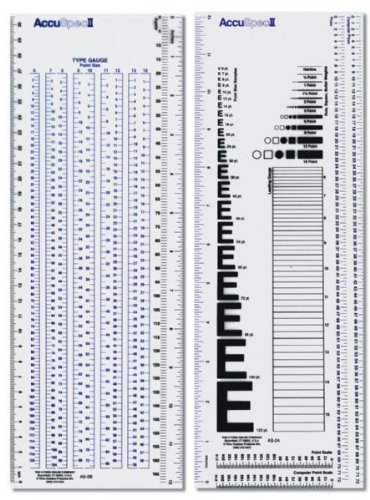
Before starting this exercise I remembered that when I did my diploma I had a pica ruler for measuring type and page layouts. I tried to get hold of one like the one I used to have, but couldn’t find one. There must be an alternative! I did some research and found a Westcott C-THRU Accu Spec II Type Gauge and Specifier Set gauge and specifier set which was cheaper to get from America than the UK. When it arrived I was surprised at how easy it was to use and how useful it was for this exercise.

C-THRU Accu Spec II Type Gauge and Specifier Set gauge and specifier set

Source: Amazon.com

I started with June’s issue of Devon Life again and picked a double-page spread to analyse. Initially I started with measuring the page layout, the border sizes, the photo sizes and number of columns. Then using my type gauge I began measuring the type used for the different parts of the layout. While measuring the type I also had to identify which fonts were used. I used Identifont.com to try to work out which fonts were used in the layout so that I could recreate it.

img_2065

The page was A4 in size and laid out in 7 columns with a 23mm border at the top and a 15mm at the bottom. The inside border was also 15mm and the outside was 8mm.

I identified the headline as a version of Baskerville that had been fairly tightly kerned and the ampersand used was from the italic version of the typeface. The sub-heading was also Baskerville. The body type wasn’t the same font, it was Times. It was set at 10pt with the leading set at 11. The drop-cap at the start of the first paragraph is in a completely different sans–serif font identified as Avenir Ultra Light. Avenir was also used for a sub-heading on the second page and also to label to photos. It is also used for a paragraph relating to a particular photo where the fonts are reversed and the serif is used for the title and the sans–serif is used for the body. All the body type was flush left and rag right and not justified at all. The headline and sub–headings were all centre alligned.

There are also some lines dividing the columns on the second page and also one that runs the width of the spread at the bottom.

Screenshot 2019-08-06 at 21.26.06Devonlife32

I then tried another publication, the 6–monthly Spoonews which is the magazine for the charity Wooden Spoon, the children’s charity of rugby.

img_2066

This spread was again A4, but this time the two pages had different layouts. The first page was again 7 columns but the second was only 3. The margins on these pages were a lot more regular with the top and bottom being 10mm and the inside and outside being 12mm.

Font identification for this magazine was a little harder than the first spread. I began by trying to identify the headline on the first page with Identifont.com. This didn’t give a definitive answer but the nearest I could match was Meta Pro Condensed. The body copy was Gill Sans which I measured at 8pt. The leading on this page was bigger than the previous publication and was set at 12pt. On the second page Gill Sans was used for the sub–heading as well. However the headline font was very difficult to match and the nearest I could find was FranklinGothic URW Ext Comp D and this was kerned tightly. The only other font used is Times for the labels in the bottom corner of the pages next to the page numbers.

Again there are a few non–type elements on the spread that are used to divide columns or frame the pages.

Screenshot 2019-08-06 at 21.26.59Spoonews2

Conclusion

I found this exercise very useful in that I got a little more familiar with InDesign. It also gave me an insight into page layouts and that they aren’t as simple as they look. The mix of type styles, column and grid layouts, hierarchy of all the elements, the legibility of the type in regards to the kerning and leading and the addition of non–type elements to help balance the page. I’ve not really done anything like this before in regards to analysing layouts in printed publications and I found this interesting and I now feel that I have a better understanding of page layouts.

If the face fits

Create your own sample book of typefaces on your computer that you can refer to. Organise them into:

  • Serif for continuous text; readable at small sizes and those suitable for headings.
  • San-serif for continuous text; readable at small sizes and for headings.
  • Script fonts that look handwritten with a pen or brush.
  • Decorative fonts only suitable for headings or ‘fun’ uses.
  • Fixed width, techno and pixel fonts for use on the web or to give a computer appearance.

Identify which typefaces have bold, italic, black or light fonts.

Now identify which fonts you might use in each of the following commissions:

  • A short story in a woman’s magazine entitled “I thought I loved him; now I’m not so sure”. The story is 1300 words long so you will need to identify a text font and a headline font.
  • An advertisement in a parish magazine asking for more helpers on the flower rota. The finished size is A6 landscape and the text reads: “Can you add that important artistic flourish to our church? We desperately need more volunteers to join the flower rota. If you can help or would like more information please contact Jennie jennie@vicarage.co.uk.”
  • A poster to advertise an after-school club for boys aged 13 – 14. The poster will be A3 size and the copy reads: “Bored? Feeling got at? Nowhere to go? Then why not come and join us on Tuesdays and Wednesdays after school in the Old Gym. We’ve got football, ping pong, table soccer, computers, Karate, cooking and lots more. All free just come along.”
  • Your friends’ engagement party. They want a flyer A5 size to send to their friends as if advertising a club night. The copy reads: “Mandy and Josh are finally going to do it…well almost!!!!! Come and join them on Friday 24 March from 8pm at the Golden Calf to celebrate their long awaited engagement… and yes lots of presents would be gratefully received particularly if we can drink them!!!!!

Then have a go at mocking up each of these. Try different fonts to see how each changes the feel of the text and make notes in your learning log about which works best and why.

Initial Research

The first research I did was to look into typography samples. I found a lot of samples of typography posters displaying different typefaces and their history. I began collecting examples of these on a Pinterest board.

I didn’t find many examples of an actual sample book, but my thought process took me back to my diploma days and I remembered the old Letraset catalogues that we used to covet at college.

14872b3c23078734b9b37e911f7c0d35

These had pages upon pages of different typefaces and their fonts which you could then get the transfer sheets of the fonts/typefaces you want for your design.

LETRASET_033-banner_1024x1024

This was how it was done pre-Adobe!!!

Back to the research…The particular typography posters that caught my eye were the ones with overlaid text. I thought I could use a similar effect for my typography sample book.

I also needed to decide which typefaces to use for my sample book. I wanted to use some classic typefaces for this exercise as they would have the history that I could use to contextualise the individual typefaces. I decided to use 3 sans–serif typefaces, 3 serif typefaces, 1 script, 1 decorative and 1 monospaced.

The typefaces I chose were:

  • Helvetica
  • Futura
  • Meta Pro
  • Times
  • Clarendon
  • Butler(Can’t afford Bodoni!)
  • Snell Roundhand
  • Stencil
  • Courier

I decided to do each typeface as a double page spread and that one page would be decorative and the other would display the font options and the history of its design.

I started with the sans–serif typefaces and went back to the overlaid type idea and thought that it might look good to do the letters spelling the typeface in outline form on a coloured background. I started with Helvetica as this seemed the most simple and straight forward to start with as the colour for the background had to be red for the famous Swiss typeface. I started with the decorative page of the spread first.

I started in Illustrator for the pages as they were going to be easier to make up and then drop the images on to the pages in InDesign.

I also set up a 20 page document in InDesign (cover, 9 double page spreads and the back cover) with a 3mm bleed and a grid to align all the elements.

I set up an A4 document in Illustrator, again with a 3mm bleed and a 10×15 grid. I then coloured the background red and began with the letters that made up the word Helvetica. I tried overlaying the letters all with the same opacity but this looked too flat and messy. I then counted the letters in the word – 9. I then changed the opacity of each letter by 10% starting with the H at 100% right down to the A at 10%. But Helvetica has 2 letter Es which wouldn’t be visible in the final design so I removed 1 and the opacity was now from 100% to 20%. This created the effect I was looking for but it didn’t look balanced because of the ascenders of the H, L and T. I added a Swiss cross to balance out the composition and add an element that indicated the font’s history. I was very happy with the result. This would be the template for my other typefaces.

ifthefacefits-helvetica

Now for the second page. I wasn’t sure as to what direction this was going to take. However, during my research into which fonts to pick I came across the website for the designer of the Butler font. I picked Butler because I originally wanted to use Bodoni but didn’t have the typeface on my computer. I did however have Butler on there and it was based on Bodoni.

Screenshot 2019-07-09 at 15.21.23

Butler Typeface

I liked the way that the type designer had laid the letters out in a grid format. I wanted to recreate it for my book. I laid out the letters in a 5×5 grid in which the I and J were combined into one cell of the grid. I then overlaid another grid of lowercase letters and changed the opacity of the uppercase grid. As well as the letters themselves I decided that there didn’t need to be numbers as they would be represented by the sample point sizes on the page. Also I wanted a bit of the typeface’s history to be displayed on the page so I had to research the typeface’s origin. The fonts contained in the typeface needed to be on the page too.

Using the grid I had set up I placed the elements needed onto the page and played with the arrangement until I was happy with the result. I thought that some of the elements could be displayed partially but still be legible, while adding interest to the design. The second page needed something to balance again due to the large amount of white/negative space and I decided to repeat the Swiss cross in line with the block of letters vertically and horizontally with the point sizes. I now had a plan for how to go about the typeface information page.

Untitled-13

Obviously I wanted each page to be different from the rest but have a common theme linking them. I decided to repeat the pages for each of my typefaces with slight differences in the display page design and layout of the second page. With the subsequent typefaces after Helvetica I wanted an element on the display pages that reflected the history of the typeface and decided to put the date on each of when the typeface was designed. I felt that Helvetica didn’t need this as putting 1957 on there was a bit cliché. I wanted to do the date in different ways and formats on each display page. The page colours were determined by my own feeling of the colour I associated with the particular typeface.

ifthefacefits-futuraifthefacefits-metaifthefacefits-timesifthefacefits-clarendonifthefacefits-butlerifthefacefits-snellUntitled-116ifthefacefits-courier

I then applied those colours to the information pages and changed the layout of each of the pages. Some of the pages needed some non–objective elements added to help balance the layout and others didn’t. All the typography on the page was done in the relevant typeface as to display it in use.

Untitled-15Untitled-17Untitled-19Untitled-111Untitled-113Untitled-115Untitled-117Untitled-119

I was really happy with the way all these had come out and the feedback I got from everyone I asked was very positive and the way I‘d made each page slightly different but the same was commented on by everyone in regards to how cohesive it all looked.

I dropped all the images into InDesign and the book was starting to take shape. I still needed a cover. I left the cover white and then took the first letter of each typeface I had used and overlaid them in the order that they appeared in the book in their relevant colour and added a title in Butler as it gave it a more classy look.

ifthefacefits-cover

This really finished off the book and was the icing on the cake. I then added all the images to the InDesign layout

Screenshot 2019-07-09 at 16.08.29

Then I mocked up the designs.

The mockup really brought the design to life and I was very happy with the result. I received lots of positive feedback and the college has even asked to use them in future publications.

This part of the exercise took me much longer than anticipated and I struggled to motivate myself for the second half.

The second half…

The next part of the exercise involved using different typefaces to convey messages on certain types of publication and to compare how the choice of typeface influences the message of the piece.

funny-memes-for-designers-6

I decided that I would only use the typefaces from my sample book for this part of the exercise.

The first one I looked at was the poster for the youth club. I went for a purely typographic approach to this. It needed to be big and bold to hit the target market of 13–14 year old boys.

The first idea involved some long shadow text and the interesting angles that it would produce. It would need to be a sans–serif typeface to give that bold look and give the clean lines needed for the long shadow. The colour scheme needed to be bright and bold to attract attention to the poster as this is its purpose. I chose Helvetica for the main headline and chose Meta for the detail because of its legibility.

ifthefacefitsyouthclubmockup1

With the second I wanted to base it around the Stencil typeface. I thought that this would give the poster a more utilitarian feel so I paired it with Courier which is purely utilitarian in nature. I gave the poster a military style colour scheme, also influenced by Stencil. The poster was given a distressed look with a rusted metal overlay to give it that vernacular typography look.

ifthefacefitsyouthclubmockup2

For the third I wanted to give it a more stylised look so I positioned the type at various 90 degree angles and skewed the whole composition to make it more interesting and eye–catching. I kept the colour scheme simple using only black, white and red. I again used a sans–serif typeface Futura for the main headline and Meta for the details.

ifthefacefitsyouthclubmockup3

Of the 3 posters I think that the first design is the most successful as it hits the target audience better than the other 2.

The different typefaces used for the posters do give them a different feel. But also how they are used on the poster changes the feel. The use of colour and hierarchy also affects the feel. I think that sans–serif typefaces are easier to read from a distance and probably better to use on posters which should be legible from a distance. Also sans–serif typefaces are viewed as more modern and would appeal to a younger audience.


The next commission was for an A6 landscape advertisement in a parish magazine. This would be a more conservative approach due to the target audience being possibly slightly older, they could be church goers and have the time to commit to the position.

The first advert I designed was a fairly simple one. It involved a floral background I downloaded from Pexels.com with the script typeface Snell Roundhand for the main message and then I used Futura for the secondary text.

ifthefacefitschurch1

ifthefacefitschurchmagazine2

With the next advert I went a little more modern approach and singled out the word “flourish” and used it in conjunction with an image of a flower that I downloaded from Pexels.com. I used Photoshop to interlace the text with the type and the flower. The sans–serif typeface(Futura) was paired with a serif typeface(Times) for the contact details etc. at the bottom of the ad. The hierarchy draws the eye in and the contact details are italicised and highlighted in a colour picked from the flower image to attract the reader’s attention.

ifthefacefitschurch2

ifthefacefitschurchmagazine1

For the third I wanted a more subdued look to appeal to the more mature church volunteer. This time I picked an image of some decorated church pews from Pexels.com which I altered the appearance by subduing the colours and giving it a coloured overlay. I then placed this on an off–white background. For the type I used Times again to appeal to target audience for both the headline and the body text. I picked out the words artistic and flourish as the primary text and made them larger in the headline to draw the viewer in. The body text was italicised to differentiate it from the headline and again to attract the reader’s eye.

ifthefacefitschurch3ifthefacefitschurchmagazine3

Of the 3 adverts I think that the second is the best. It is attractive, bold and modern. This may not appear to all church goers but to me it is the best design. The third may appear to the more conservative reader which maybe a more appropriate advert it would depend on the type of church. The first is the least successful as it is too busy and difficult to read even when the type is made bolder.


Next was the magazine article. I wanted to try different styles of magazine and try to use the appropriate type to convey the desired feel for the various magazine styles. I chose to use an older teen magazine, a trashy, T.V. style magazine, a more mature magazine and a high–class magazine.

All 4 designs were done in InDesign. I wanted to explore the software more and become more familiar with it. The first 3 designs I used a 3 column grid and used a more complex grid for the fourth.

I generated the body copy from Lipsum.com.

For the first magazine I picked an image from Pexels.com that would be large enough for the background. As this was a dark image I would have to reverse the type out of the background. The typeface I used for the headline was Futura to give it a bold modern look that would appeal to the younger audience. I chose Butler for the body copy as it is easy to read in a small point size. Aligning the body copy “flush left, rag right”, I had to make sure there weren’t too many “widows” or “orphans” and also the body copy had to be of the right point size to fit within the constraints of the page.

ifthefacefitsmagazine1

The second was more straightforward to layout. I picked 2 images form Pexels.com that were related to each other as I wanted an image on each page. I used bold colours to highlight the first column and also the headline which I split over the 2 pages. I used Stencil for the headline type to give the impression of scandal and injustice as well as importance. This time I used Helvetica for the body copy which was still clearly readable in 10pt. However, 10pt Helvetica takes is larger than 10pt Butler so the copy took up more room on the page.

ifthefacefitsmagazinemockup2

This time I wanted to see if I could fit a larger point size of body copy. This meant that imagery would be minimal. I placed the body copy on to the page first in 12pt Times to see how much space I’d have for the title and any imagery. Because of the use of larger body copy I used only part of an image which I cropped on the right of the spread. I shaped the body copy around the image which was tricky to not leave any widows. I made the headline a feature by giving it large quotation marks to draw the eye to it without having to make the type any bolder. I used Butler for the headline as it is a lot more subtle than Times and made it look more sophisticated.

ifthefacefitsmagazinemockup3

The fourth design was something I did for myself to see if I could play around with column widths and type sizes all within the page giving the impression of lots of different elements while still having the required number of words on the page. I put 5 columns on the first page and 7 on the second. On the spread there is 250pt Snell Roundhand; 8pt, 10pt, 12pt,15pt and 18pt Futura; 12pt and 29pt Times. The use of different typefaces in different sizes helps to emphasise certain parts of the article and gives the type its hierarchy. I again chose an image form Pexels.com to represent the story being told.

ifthefacefitsmagazinemockup4

Of all the designs I think I prefer the first one. It has big impact due to the hierarchy and the body copy being reversed out of the black background.

The fourth design is interesting and I really like the use of different typefaces but I think it’s a little disjointed and doesn’t really look like a single article but it I did enjoy doing it as a self-lead exercise and like the layout as it’s a bit different.


The final part was to design a flyer for an engagement party. Initially I missed a key piece of information in the brief that said it was themed around a “club night”. So my first designs weren’t hitting the brief. Back to the drawing board! I wanted to make sure these were predominantly typography based but some imagery would need to be used in order to convey the flyer’s message which I would get from Pexels.com.

For the first flyer I found an image of a DJ that I used as the background. I then added the type in Futura as this seemed the right typeface for the modern, clean look I was going for. I separated the date out to make it an element on its own. For balance I added some non–objective elements which framed the design. The names were made the main element of the design with the rest of the type in a smaller point size and italicised. I chose bold colours for the different elements to give the flyer a club feel.

For the second flyer I again used an image of a club scene as a background which I blurred as I didn’t want it to detract from the type while still adding a little colour. This time I wanted to make the date the primary piece of type. I chose a serif typeface(Butler) for this flyer as I wanted to give it a more mature, sophisticated look. The date was stacked and the kerning on the slashes to bring them in a little tighter so that the stacked date didn’t look off balance. I then split the body type into 3 and aligned it with the 3 rows of numbers. The names and RSVP were added top and bottom but only slightly larger than the body type as to not detract from the date being the primary element.

The third flyer I did in landscape because of the image I chose for the background was orientated that way. I wanted the flyer to be bold like the first on and chose Helvetica for the typeface to give it a clean look. As with the second church advert I wanted to interlace the type with the image and did this in Photoshop before importing it into Illustrator to finish off the design. I added the body type and highlighted the important pieces of information such as the venue and date.

Of the 3 designs I think that the first 2 are the better of the group. The first gives that party/club feel due to the bold sans–serif typeface and brightly coloured type. The second is my personal favourite as the type is the star and not the image. It is more refined and looks a lot more classy than the others.

Dyslexia

As part of my current job role I teach functional skills including English. On a recent course the subject of dyslexia came up and it was interesting to find out how people with dyslexia tend to read. Dyslexics read the shape of words rather than the individual letters. They also prefer sans–serif typefaces as opposed to serif ones as the serifs alter the appearance of the words. During the conversation the question was asked, “which typefaces/fonts would work best for people with dyslexia?”. I felt that it would be a sans–serif typeface like Helvetica, but was surprised to find that one of the easiest typefaces for people with dyslexia to read was Comic Sans as the word shapes are clearly defined.

The following article I found explains it in more detail:

Best Fonts for Dyslexia

Conclusion

I really enjoyed this exercise but it was a long slog!

The first part of the exercise designing the sample book was my favourite part. I thoroughly enjoyed the task of trying to display the different typefaces in different and creative ways while making them cohesive throughout the book. I think this shows in the final mockups. I also got a little more familiar with InDesign which I haven’t had much to do with in the past.

The second part of the exercise was a little more in-depth. It involved a lot of work doing 3 variations for each of the 4 publications. The posters, ads and flyers were the easy ones. I used software I was familiar with and the briefs for these were straight forward. The article was a bit more difficult as I was unfamiliar with InDesign and had to learn how to set up documents and text boxes and how to drop images into documents. It was tricky to fit all of the type in and adjustments had to be made to accommodate all 1300 words.

The exercise did however serve its purpose. It showed me how type can influence the design of various documents and the feel of the overall publication. It also depended on the target audience as to which typefaces would be appropriate for them. The type of publication can influence what typefaces should be used and who they appeal to.

This exercise was really useful in making me more aware of how type and the way it is used can have a big impact on what is being designed.

Images downloaded from Pexels.com

Butler typeface available from fabiandesmet.com


Research point

Vernacular typography can be very well crafted but it can also be crudely created signs done in a hurry. Either way it is using typography and lettering to create visual communications. Take a look around you and identify some vernacular typography that you find interesting. Document it through drawing, photography or by collecting examples. Remember to ask permission if you are photographing inside train stations, markets, shops, museums or shopping centres for example. Getting permission is usually straightforward, especially when people know you are working on a student project. In your learning log note down why you selected the examples you did.

Vernacular

noun: vernacular; noun: the vernacular

the language or dialect spoken by the ordinary people in a particular country or region.
“he wrote in the vernacular to reach a larger audience”

Synonyms: everyday language, spoken language, colloquial speech, native speech, conversational language, common parlance, non-standard language, jargon-speakcantslangidiomargotpatoisdialect

Antonyms: formal language, Latin
the terminology used by people belonging to a specified group or engaging in a specialised activity.
plural noun: vernaculars
gardening vernacular
architecture concerned with domestic and functional rather than public or monumental buildings.
“buildings in which Gothic merged into farmhouse vernacular”
adjective: vernacular

(of language) spoken as one’s mother tongue; not learned or imposed as a second language.(of speech or written works) using the mother tongue of a country or region.

vernacular literature

(of architecture) concerned with domestic and functional rather than public or monumental buildings.

vernacular buildings


I had heard the term vernacular before but wasn’t sure of the meaning. In reference to typography the images it conjures up are hand written signs, circus and promenade show signage and greengrocers’ pricing. However, I now understand that it refers to a lot more than that. It refers to everyday typography used in everyday situations and how it has been manipulated and transformed to fit its purpose, situation and time; it relates to how the typography fits its function and setting; it is the context in which it’s used.

I have collected photos of vernacular typography around the village where I live to illustrate its uses in everyday forms as well as pieces that I like from the internet.


The above images were taken in and around the village I live in. The majority are utilitarian in their usage. However, they are all very different and vary in age from pre-war to the modern day.

Above are examples of the images of vernacular typography that I have on my Pinterest typography board. I like the creative works added to walls to advertise or to put across a message. I am also drawn to utilitarian typography that appears on day to day and how creative and beautiful it can be. I particularly like some of the old London Underground typography and mosaics.

A designer that I follow who uses a lot of vernacular typography, especially for his merchandise is Aaron Draplin who is based in Portland, Oregon USA.

Vernacular typography is everywhere and most of it goes unseen every day. It can be used for anything from the label in your clothing to a billboard on the side of the road.

Through this exercise I now have more appreciation for the typography around me.

A typographic jigsaw puzzle

This exercise is designed to help you to look at typefaces more closely. You will need a sharp pencil, some tracing or thin paper and a ruler.

On the facing page the typeface Baskerville has been deconstructed so it only contains the strokes, serifs and bowls that are common to all the letterforms. Your task is to try and put it all back together again to read:

the quick brown fox jumps over the lazy dog

This is a pangram containing all the letters of the alphabet. It is all in lowercase.

Start by drawing your baseline, determine the x height by identifying a whole letter such as x, e or n and draw your median line. This should provide a good starting point to try and piece together all the other elements. Remember that some parts will be used more than once, for example the same stem will be used in several letters. Try and account for all the parts without leaving any stray serifs behind.

Do not worry if you get this exercise wrong, it is just a way to get used to looking at and analysing typefaces, appreciating the finer detailing of it and recognising repeat patterns, such as using the same bowl shape throughout the typeface. If you do get it wrong then you might have ended up designing your first typeface!

Having spent some time looking closely at typefaces, has your appreciation of them increased? If so in any particular aspect? Do you think that understanding more about how typefaces are constructed will be useful to you in future? Make notes in your learning log.

Construction…

I began by copying the image of the deconstructed Baskerville type.

png-image-e1559935810477.png

Some of the elements of the type were pretty obvious as to what they were, the E, S, O and C. Others were not so obvious. I decided to do some more research into typographical anatomy to see if it would help me to piece the puzzle together. I came across the image below in my research and it seemed to be one of the best and most concise descriptions of the different typographic elements and their names.

typography_gloassary

Source: cucocreative

I also found this video clip that also helped identify the typographic elements pictured above.

Source: lynda.com

I started on the iPad using Procreate as I could then do this exercise and take it to work with me and do it in my spare time. I added the picture of the typeface elements onto a layer and then began tracing them on a new layer.

I started at the beginning of the sentence with the letter T. The T,H and E were pretty straight forward then I hit my first bump in the road. The bowl of the Q wasn’t as obvious as I thought and my first choice didn’t fit, it was actually the bowl of the letter D which I’d use later on.

The next tricky letter was the R and which was the right stem? It took a couple tries ti find the correct one before adding the shoulder.

Then came the W. Trying to find the right stems for the W proved somewhat tricky. Eventually I noticed the flat bottom on the base of the wider stem and this was repeated on the upturned v shape. The final pice of the W was the upstroke stem with a bracketed serif on the top. There were two to choose from, so it was a case of trial and error to find the right one. The remaining one would be used on the V later. It was at this point that I added my baseline and x–height lines. This made things much easier to align my type.

The M took a little working out. But having done the N earlier this gave me a head start as they share some characteristics.

The rest of the letters were straight forward and I eventually got to use that bowl from earlier on the D.

My Procreate video of the process.

Conclusion

This exercise was not as straight forward as I thought it would be. It did however give me an insight of the intricacies of typography and typeface design. It made it more obvious to me that once you have a few elements, they can be used and repeated to construct an entire typeface. However, certain elements have slight differences which help give typefaces their individuality.

This exercise has given me more of an appreciation of type design and I hope I can use this going forward in future exercises/assignments or even designing a typeface of my own.

Research point

The alphabet is only part of a typeface that contains lots of different characters such as numbers, punctuation, mathematical and monetary symbols and ligatures. Ligatures are where two letters are combined together to make printing easier. Explore you computer keyboard to find some of the other characters. You will need to use your shift, alt and ctrl keys.

Choose a magazine, for example the Big Issue or Heat, and look at the main typefaces they use for the body text and headlines. Go to http://www.identifont.com and use the programme to identify the fonts. Look at the ranges of typefaces all around you and try to identify their distinguishing characteristics. Make notes in your learning log.

Exploration

I started to look into what special characters could be found on the mac keyboard. I knew a couple of them but there were a lot more than I thought. I compiled a list and placed them into a table below.

There are also options for typing accents.

Accent Example Small Letter Capital Letter
Acute á Á [Option + E] Vowel [Option + E] [Shift + Vowel]
Circumflex â Â [Option + I] Vowel [Option + I] [Shift + Vowel]
Grave à À [Option + `] Vowel [Option + `] [Shift + Vowel]
Umlaut ë Ë [Option + U] Vowel [Option + U] [Shift + Vowel]
Cedilla ç Ç Option + C Option + Shift + C
Eszett ß Option + S Option + S

Alternatively, press and hold the special letter key to view the options similar to iPhone or iPad keyboard. In order to show the options for capital letters press and hold shift with the special key.

There is also the option of using the keyboard viewer from which you can copy and paste special characters.

Magazine typography

For this part of the exercise I popped to the village post office to peruse their limited selection of magazines. The best of the bunch was Devon Life magazine (Yes, I’m getting old!).

tP3H45gZSoaOzc16oxHeaA

I then used Identifont.com to try to identify the fonts used. I have used it before and found it very useful and much better than most of the onscreen font identifiers such as WhatFont, Fontface Ninja and Adobe Capture.

Initially I thought the title font for the magazine was Baskerville and Identifont seemed to agree. However, as I investigated more Baskerville seemed less likely and it seemed more like Times Roman. It was difficult to tell as the magazine title had been distorted.

Next I used Identifont to identify the condensed sans–serif font. It identified it as Block Gothic Condensed.

The numbers on the cover again were something different. My research with Identifont and also comparing fonts it was something like Bodoni. This was also the same font used for the bold italic sub–headings.

The main article headline seemed to be in yet another font! Through trying to identify it the nearest I could find was Century Schoolbook as it wasn’t quite Didot.

I then tried to replicate the cover in Illustrator.

Devon-Life

I didn’t have all the relevant fonts on my computer but tried to find the nearest I could. Times Roman was replaced with Times New Roman. The terminals on the lower arm of the capital E weren’t quite right. Block Gothic Condensed was replaced by GoodPro–XCondBlack which was a very close match. The Bodoni–like font used for the numbers and sub–heading type was replaced with Stilson which is a Bodoni derivative. The main headline was done in Century Schoolbook but this wasn’t quite right as the serif were too bold.

Overall I think it is similar to the original but I think that some of the type on the magazine cover had been distorted, especially the title.

The interior articles used both serif and sans–serif fonts. Using Identifont I identified the serif font used for the headlines as JHA Times Now Extra Light. A version of Times was used for the body type. I doubt it was the same as the headline font as it wouldn’t be legible at smaller sizes. The sans–serif font I identified as Suprema which was used in a variety of weights.

As well as the stretched type on the cover their was also a spelling mistake and I noticed in one particular article that the leading on one of the headlines had cause the descender and ascender to overlap making it look very messy.

I then tried to capture examples of type around me in as many different settings as I could within the confines of the village.

Type is everywhere! A good book that puts this point across very well is Stop Stealing Sheep & Find Out How Type Works by Erik Spiekermann and E.M Ginger which I have just finished reading and it gives some good insights into what typefaces are used and why depending on what they are used for and how legible it needs to be.

While doing this exercise I also watched the documentary film about Helvetica and it’s origins and usage all around the world and it’s Marmite reputation. I really enjoyed it.

220px-Helvetica-film

Conclusion

This was a struggle. I found it hard to motivate myself to search for fonts and procrastinated a lot! However I did learn the importance of being able to identify fonts and their uses. This will prove useful going forwards in selecting fonts and checking that they are fit for purpose and how they work together.

Playing with words

Using the following words create typographical representations that present both the word and a suggestion of its meaning.

  • Sad
  • Safe
  • Sardonic
  • Saucy
  • Scholarly
  • Serious
  • Shadow
  • Shattered
  • Shy
  • Short
  • Silly
  • Sinking
  • Skimpy
  • Sleek
  • Smart
  • Snowy
  • Sodden
  • Soothing
  • Sordid
  • Sophisticated
  • Speed
  • Squat
  • Squeeze
  • Stiff
  • Stodgy
  • Stoned
  • Style
  • Supine
  • Swagger
  • Sweet

Start this exercise by working on A4 sheets of paper. Set the words in 48pt Helvetica Bold, print and cut out the words and then arrange them and stick them to a sheet of paper trying to capture the meaning of the word visually. Think about the composition, using the white space of the page to help you construct your meanings.

Then work digitally using any of the software you have available. Explore how you can set text at a slant, at different sizes, in different colours and fonts. Try using filters in your software for other effects.

Make notes as you work explaining your choice of representations and which ones you feel that you were most successful with.

Start…

This exercise looked quite daunting with such a long list of words, a couple of which I wasn’t sure of the meaning! So the first task was to find the meaning of the words that I was unsure of…

Once I’d done that I printed out the words in 48pt Helvetica as instructed and one by one cut out the words and arranged them on a sheet of A4 while trying to convey their meaning.

IMG_1844

This wasn’t an easy task. Due to the restrictions of the brief I found this quite hard and later found that I had interpreted it wrongly and stuck all my words to the same sheet and therefore not getting to use the whitespace to help illustrate the words. Black mark for Craig!

fullsizeoutput_e7e

However, I think that some of the of the solutions worked really well in this format. The only word I had trouble with in this part of the exercise was saucy. I couldn’t think of a way to depict the word in this format.

I think my favourites from this part of the exercise are squat and shy. I think I prefer them because they are whimsical in their outcome.

I then moved to digital.

Using both Illustrator and Photoshop I repeated the exercise and tried to depict the words using different colours, sizes, typefaces and effects.

Playing-with-words

With some of the words I just changed the typeface to depict the meaning of the word such a scholarly, sophisticated and stiff. Others had elements of the words changed such as serious, short and sardonic. Some of the words had effects applied to them in Illustrator and others had effects applied in photoshop and then imported into Illustrator.

Layer 1

I much preferred this part of the exercise as being able to manipulate the words digitally allowed a lot more flexibility in what can be done. I still found it challenging to depict some of these words. I feel some were more successful than others. The one I struggled with on the part was the word swagger. I ended up just using the typeface “swagger” to depict the word. Ironically the word I struggled with in the first part of this exercise was one of the more successful ones in the second.

saucy

I think my favourites from this part are short and sinking because they are both subtle and simple in their execution and depict the words very well and are still in Helvetica!

Untitled-3

I then returned to the first part of the exercise and took the 2 outcomes I liked and returned to the original brief and placed them individually on A4. I did however cheat a little and do them digitally.

shyandsquat

I could now see that the whitespace was an important part of the composition. I did feel a little uncomfortable warping text which I regard as a big no-no, but was necessary for this exercise. This made me realise that negative/whitespace is just as important in a design as much the design elements themselves.

Research Point

The history of typography, printing and reading are all linked; what else can you find out about this history that you find interesting? Perhaps you are interested in a particular era, form of typography or particular area of reading. It might be a wide subject such as the history of the alphabet, or something very specific such as the use of typography in Film Noir, comics or American crime novels.

Undertake some secondary research to find out more, taking notes along the way and collecting examples for your visual diary.

Current research

I am strangely drawn to typography from its utilitarian usage to clever typographic logos to layouts both grid based and those that break the grid. I have a few books on typography and I am interested in the intricacies of type design and layout. My current bedsides reading is a book called “Stop Stealing Sheep & find out how type works” by Erik Spiekermann & E.M. Ginger. The great type designer Frederic Goudy once said that “anyone who would letterspace blackletter would steal sheep.” Blackletter, in typography, are the “Old English” type of faces you see used for newspaper names, and letterspacing is just stretching the word out so that there are gaps in between the letters. Evidently Goudy thought that this practice was a typographic abomination. The book covers everything from type design, layout, history and how type is everywhere in our day–to–day lives.

fullsizeoutput_c15

“Type & typography” by Phil Baines and Andrew Haslem  is on the course reading list and I have briefly looked at this. I have also read “typographic design: form and communication” by Rob Carter, Sandra Maxa, Mark Sanders, Philip B. Meggs and Ben Day which is a great book for typography and layout beginning with the earliest marks made by early man in 3150BC through the invention of the printing press to the present day.

I already have a typography board on Pinterest as well as a logo board that contains lots of typographical logos. I also follow several typographers and letterers on Instagram.

Screenshot 2019-05-02 at 20.40.32Screenshot 2019-05-02 at 20.41.36

My personal preferences in regards to typography are quite varied. They range from classic typographers like Josef Müller–Brockmann, Max Miedinger and Paul Renner to current designers like Chris Ashworth and Jessica Hische.

Image result for josef muller brockmann
Strawinsky/Fortner/Berg by Josef Müller–Brockmann (1955)
Image result for chris ashworth design
Raygun Magazine cover by Chris Ashworth (1996)
Jessica Hische via www.mr-cup.com
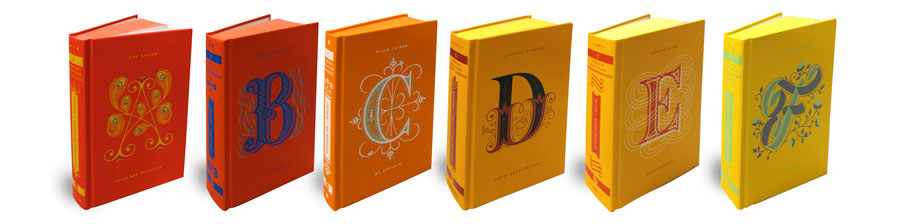
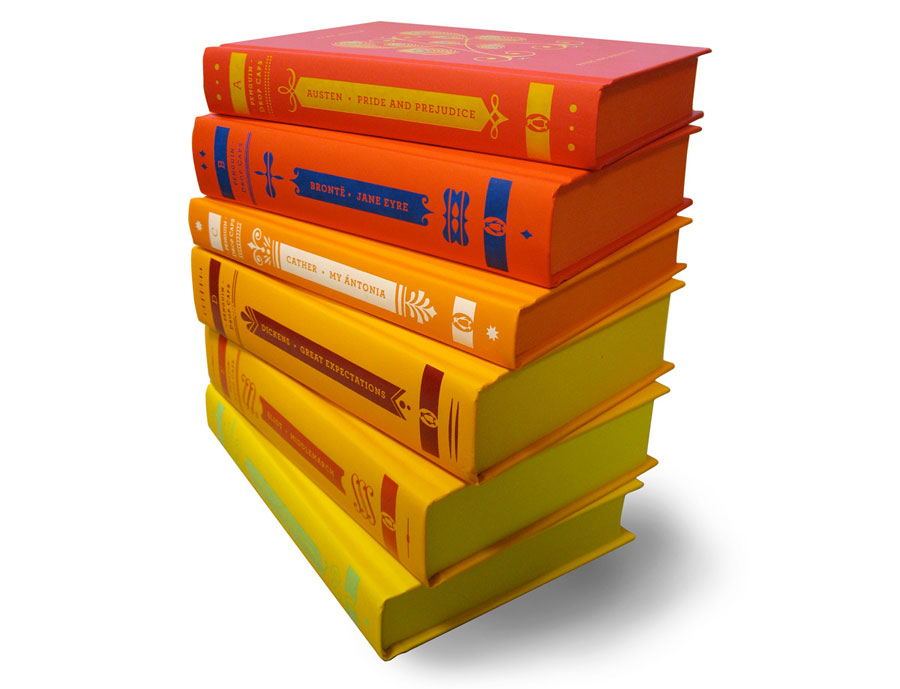
Penguin Drop Caps by Jessica Hische (2012)


Colour me

This assignment draws on what you have learnt through the projects and exercises so far, working with visual dynamics, colour, collage and visual language.

The brief

To produce a poster (297mm x 420mm) that celebrates a colour of your choice. Choose a colour that has a meaning that you want to explore and celebrate. Think about what the colour you have chosen means both to you and to other people and create something that celebrates that meaning, for example you may choose a golden brown because you like real ale, a vivid green because of a particular landscape, green to celebrate Irish identity or the yellow sandstone of Bath’s architecture.

Requirements

Work only with your chosen colour, its complementary colour and black and white. You can include text, collages, illustrations and photographs. Use black and white to help establish a range of tints and shades with your chosen colour. These limitations are to get you to work with colour thinking creatively about how to make a limited palette work for you. This project is as much about visual dynamics and contrast as it is about creating something with meaning. Make full use of it to show off to your tutor all the skills and processes you have learnt so far.

You need to submit at least three variations of your poster as well as the finished artwork.

My colour choice


Screenshot 2019-04-24 at 20.36.37

Screenshot 2019-04-24 at 20.23.24Screenshot 2019-04-24 at 20.23.43

Turquoise, a blend of the colour blue and the colour green, has some of the same cool and calming attributes. The colour turquoise is associated with meanings of refreshing, feminine, calming, sophisticated, energy, wisdom, serenity, wholeness, creativity, emotional balance, good luck, spiritual grounding, friendship, love, joy, tranquility, patience, intuition, and loyalty.

Tints of turquoise colour have a sweet feminine feel. Darker shades of turquoise, such as teal have a more sophisticated feel. Variations of turquoise, which often is used to represent water, also is referred to as aqua and aquamarine.

Turquoise is a valuable mineral that is often use for jewellery, especially in the American Southwest and Middle East. Turquoise is one of the oldest protection amulets and in many ancient cultures was a symbol of wealth and prosperity. Turquoise was associated with connections to the spiritual world, psychic sensitivity, and protection from harm and negative energy.

The turquoise gemstone is the symbol of friendship and brings peace to the home and good fortune to the owner. The turquoise stone is believed to carry with it great truth and wisdom inside it. The turquoise gemstone is a stone that represents realisation and is an aid in analytical thinking as well as creative energy.

The name turquoise means “Turkish Stone” as it came to Europe from Turkey. The best quality turquoise comes from Iran. Today, the majority of the turquoise gemstones come from the United States and Mexico.

The colour turquoise has healing properties that affects the mind and the body. Turquoise is believed to help neutralise over acidity, increase growth and muscular strength, and alleviate gout, stomach problems, viral infections, rheumatism. Turquoise also is believed to be an anti-inflammatory that also helps to enhance communication skills, and calm the mind and body.

Too much turquoise can cause one to become over analytical, fussy, and egocentric, allowing one to let logic guide decision-making. Too little turquoise can cause one to become secretive, closed off, confused, sneaky, and even paranoid.

Additional words that represent different shades, tints, and values of the colour turquoise: teal, ultramarine, blue-green, aqua, aquamarine.

I chose this colour because of my love of the sea and it’s calming and peaceful effect. Plus I didn’t think black would be a good choice!

Start…

I began by curating images on Pinterest that were in what I thought of when I thought of the colour turquoise and also ideas of how it could be used.

Screenshot 2019-04-24 at 21.25.14

This brief gave me the opportunity to try out some new techniques and again work in Photoshop rather than its more familiar cousin Illustrator. I also had some ideas of what direction I wanted to take the images in. There would also be a possibility of again using some of my own photography in at least one of my posters.

I mind-mapped the colour to see where it took me. I decided to use my new iPad and the Procreate app as a digital sketchbook.

Untitled_Artwork

Design #1

For the first design I picked up on the words bubbles, water and light. I wanted to create something with a photographic bokeh effect.

In photography, bokeh (/ˈboʊkeɪ/ BOH-kay; Japanese: [boke]) is the aesthetic quality of the blur produced in the out-of-focus parts of an image produced by a lens. Bokeh has been defined as “the way the lens renders out-of-focus points of light”.

Source: Wikipedia

I started designing in Procreate and producing some very quick coloured sketched to see what effect I could achieve.

Bubbles

I first created a document and using the bokeh brush in Procreate using various sizes and tones of turquoise with varying opacity.

Bubbles_2

I then added some shafts of light on a separate layer.

Bubbles_3

Then I added the image of a diver as this was where the inspiration for my colour choice came from.

I liked where this was going. I had saved an image that I liked that I thought would give a similar effect in a more uniform and geometric pattern.

Scuba Blue hexagons art background abstract vector

I was more familiar with Illustrator than Procreate, so I tried to recreate a combination of my Procreate sketches and the shutterstock image.

Screenshot 2019-04-14 at 21.35.38

I created a hexagon pattern with varying tonal patterns and then duplicated the layer and rotated it through 45 degrees and altered the opacity so both layers were visible. I then exported this into Photoshop to continue building the design.

Screenshot 2019-04-27 at 22.10.06

I set up an A3 document in Photoshop as per the brief and added the background image that I had created in Illustrator.

Screenshot 2019-04-27 at 22.10.28

I then created the shafts of light coming through the stylised water.

Screenshot 2019-04-27 at 22.10.53

I changed the image of a diver to a female diver as turquoise is a feminine colour and I felt it was more appropriate and in keeping with the colour’s characteristics. This image was placed in front of the background image but below the light shards and the opacity lowered to show the background image through it. To get more contrast I adjusted the background mode to difference and then placed another copy of the background image on top of the diver and change the blend mode to linear light to retain the turquoise colour.

Screenshot 2019-04-27 at 22.11.37

I felt that the background needed another element in it and the diagonal lines of the light shards needed balancing. In my research I had noted down the term depth charts. This led me to dive tables which are used to calculate dive times in the absence of a dive computer.

IMG_0005

I found an image of a dive table and placed in behind the background image and used the pin light blend mode to give it a slightly distorted look while retaining some detail. The poster was coming along nicely, but still lacked some more detail and I was worried that it wasn’t obviously about the colour.

Screenshot 2019-04-27 at 22.12.00

Using the contrasting colour I added a T.S. Elliot quote that I like and reminds me of diving in the turquoise waters. I aligned this with some of the detail from the dive table. I duplicated this layer again to give more contrast.

Screenshot 2019-04-27 at 22.12.21

I finally decided to identify my chosen colour by displaying the hex value in the bottom left corner. This seemed a bit isolated so I added a dash above and below which then aligned it with the hexagonal pattern of the background and also the dive table elements to give it more balance and also aligned it with the vertical quote on the previous layer.

Colour me 1

Overall I really like this poster and think it is really effective. I’m not sure it says “turquoise” to everyone, but from my point of view as a scuba diver I think I’ve achieved what I set out to do with this one.

Design #2

Design #2 came straight off the back of the first poster. The idea of having the colour labelled on the poster in unorthodox ways (hex value in the previous poster) gave me the idea of a poster as a Pantone chip.

Sticking with the scuba theme I mocked up an A3 Pantone chip with a duotone image of a diver in water using turquoise and its complementary colour.

I first had to find out what the Pantone equivalent was for the turquoise colour I had chosen. It was pretty easy to find it by Googling the relevant hex value and finding the nearest match.

Screenshot 2019-04-27 at 22.54.57

To my best guess the typeface used on the Pantone chips was Helvetica, so I layed out my text for the colour chip.

Screenshot 2019-04-27 at 22.55.09

I then added the image of a scuba diver looking up at the surface of the water which I had desaturated, increased the contrast and removed the background.

Screenshot 2019-04-27 at 22.55.27

To achieve the duotone effect I was after I then added a gradient map to the picture of the diver using turquoise and its complementary colour as the two colours of the gradient.

Colour me 2

Considering that this was just an off–the–cuff idea It has grown on me and I really like the combination of a graphic design reference and scuba diving as well its simplicity and boldness.

Design #3

For my third design I wanted to use some of my own photography to depict what turquoise meant to me. As I said earlier turquoise to me conjures up images of the ocean, particularly diving in the waters of the Caribbean off the island of Anguilla where my wife and I are lucky enough to have relatives who we feel “obliged” to visit!

Anguilla is a British overseas territory in the Caribbean. It is one of the most northerly of the Leeward Islands in the Lesser Antilles, lying east of Puerto Rico and the Virgin Islands and directly north of Saint Martin. The territory consists of the main island of Anguilla, approximately 16 miles (26 km) long by 3 miles (4.8 km) wide at its widest point, together with a number of much smaller islands and cays with no permanent population. The island’s capital is The Valley. The total land area of the territory is 35 square miles (91 km2), with a population of approximately 14,764 (2016 estimate).

Source: Wikipedia

Over several visit to Anguilla I have captured quite a few photos of different parts of the island and wanted to use one of them on this poster.

During my research into duotone images I can across some poster designs that used black and white photos with large panels of colour overlaid on the top. This really caught my eye and I wanted to replicate the style.

Of the several photos I had I chose the one below as a base for my poster.

IMG_1313

I imported this image into Photoshop and changed it to black and white and played with the levels to change the contrast.Screenshot 2019-04-30 at 20.45.23

I then added a block of turquoise over the top of the photo and used the blend mode multiply to make it transparent. I placed the block over 3/5ths of the photo while leaving the white border to give plenty of contrast.

Screenshot 2019-04-30 at 20.45.44

As with the two posters I had found during my research I wanted to make them into an advertisement for the island. This would involve adding type. Initially I added the letters BWI(British West Indies) reversed out of the photo for maximum contrast. I also wanted it to slightly overlap the coloured block to add a bit of interest and to slightly “break the grid”.

Screenshot 2019-04-30 at 20.45.57

I then added the name of the island but wanted to reflect the three letters of BWI and broke Anguilla into a 3×3 grid with the inclusion of a hyphen. This was then aligned with the base of the turquoise block and vertically with the BWI.

Screenshot 2019-04-30 at 20.46.16

I then added the coordinates of the island and placed them at a 90 degree angle in a tint of turquoise.

Screenshot 2019-04-30 at 20.46.32

As with my previous 2 posters I wanted to add something about the colour itself. I added some micro–text under the island name listing the colour’s characteristics.

Screenshot 2019-04-30 at 20.46.47

I toyed with the idea of adding some more texture behind the image with a map of the Caribbean but I felt this made the image too busy and dirty looking.

Screenshot 2019-04-30 at 20.47.15

The single colour over the black and white image looked quite flat. It needed something to lift it. I decided to add another block of contrasting colour. The orange/brown colour of the contrasting colour lends itself to the colour of sand, so I laid the second colour block over the land in the background image.

Screenshot 2019-04-30 at 20.47.30

Colour me 3

This lifted the image and made it look so much better and more interesting. Overall I think that this image looks like an advert for the island of Anguilla and wouldn’t look out of place in any travel brochure or departure lounge.

Design #4

As design #2 was a bit of an off–the–cuff design I decided to do 1 more poster.

For this one I wanted to do a proper duotone image combined with the current trend of overlapping elements. This was going to be a type based poster with a image element interlaced through it.

Starting with the text element I wanted to use 2 words that meant what turquoise conjured up which again as before it was the ocean and being in it. I picked the words SUN and SEA as they both contained 3 letters which would balance nicely and hopefully represented complimentary things.

I first placed the text on the canvas in a bold, geometric, sans serif typeface Avenir Heavy in turquoise’s complimentary colour. I duplicated the layers to give a slight shadow to the type.

Screenshot 2019-04-30 at 21.55.24

I then added an image of a diver that I had found and duplicated it again to create a shadow and placed it between the 2 layers of type. I again used an image of a female diver because of the feminine characteristic of turquoise. I had to remove the background of the image which I did using the Quick Selection tool.

Screenshot 2019-04-30 at 21.57.41

I then made a selection of the woman’s dive mask and hair from which I made a new layer that I placed on top of the type layers. This layer was then duplicated to create a shadow.

Screenshot 2019-04-30 at 22.09.29I then needed to add the main colour. I did this by placing a gradient map over all the layer with the gradient being made up of turquoise and its complimentary colour. This would add the duotone effect that I was after.

Screenshot 2019-04-30 at 22.12.04

I was very happy with the poster so far but felt it needed more texture, so an overlay of some water was place above all the other layers and given a blending mode of soft light to make the texture subtle.

Screenshot 2019-04-30 at 22.16.27

I felt that there wasn’t enough contrast in the image but with the limited palette it was difficult to add more. I decided to add some more type in the form of a quote. I found a great quote that I found quite poignant in regards to this assignment by an American celebrity interior designer. I placed this quote in white on top of the image in a classic serif typeface Bodoni and then added the credit for the quote in Avenir to reflect the type already used for the poster. I also wanted to make sure that I used the correct punctuation for the quotation marks(alt+[/shift+alt+[) and for the apostrophes(shift+alt+]) rather than the default marks that are usually for feet and inches(‘/”)

Screenshot 2019-04-30 at 22.21.13

I was very happy with the way this poster had turned out especially as it was on trend at the moment.

Colour me 4

Final choice…

I mocked up all 4 posters to put them more into context.

Colour me 1 Poster mockupColour me 2 Poster mockupColour me 3 Poster mockupColour me 4 Poster mockup

I liked all 4 of the posters I had created, it was difficult to decided between them. They all had qualities I liked:

  • The first poster had a lot of details in it that I felt all related well to each other and created interest to the viewer.
  • The second poster was humorous and spoke to both my thoughts on the colour and the colour as a graphic design element.
  • The third poster had a strong graphical element and definitely spoke of turquoise oceans. It also look very high class.
  • The fourth poster was right on trend and looks very editorial.

The feedback from everyone I asked didn’t help with my decision either! They all liked different ones for different reasons.

It was just a case of picking one…

Colour me 1 Poster mockup

I chose this one because I think I put the most work into it and it draws you in with all the different elements and is more subtle than the other 3. However this wasn’t a definitive choice because I liked them all. However I am biased!

Conclusion

As with the photomontage exercise I was a little apprehensive about this assignment as the brief was so open-ended. But once I had chosen my colour(not black!) it seemed to make things easier as I had a clear idea of what the colour meant to me.  This then gave some direction when it came to idea generation. As before I found it hard to put ideas down on paper and someone suggested the iPad app Procreate might be a happy medium between physical and digital in regards to a sketchbook. It helped a little and I definitely made more of an effort in developing ideas before jumping onto the computer, but there is still room for a lot of improvement on that front. However I feel the end result has been very successful and hopefully says turquoise to other people besides myself.

Photomontage

For this exercise you are going to make a montage or collage with a political message. Your subject matter could be a current issue, or something that you feel strongly about such as animal rights, the treatment of elderly people in hospital or images of women in the media.

Collect images from newspapers, magazines, your own photographs or images online. Do remember that some images may be copyright – particularly anything associated with commercial companies or organisations. Create new meanings out of these extant images by juxtaposing and contrasting them. Be imaginative, playful, provocative or humorous.

If you have access to a scanner, then scan in your found images and create collages or photomontages with Photoshop. Try working with layers; exploring a variety of selection tools, such as your magic wand or magnetic lasso; utilising the cutting and pasting options – try and learn the keyboard shortcuts for these; adjusting the contrast, colour and balance of your images; and resizing elements of your photomontages. Make sure you keep your original psd photoshop file with all your layers intact and export a jpg image with your layers flattened for the final piece of artwork.

In your learning log reflect on the original meaning of the images and your subsequent collage. Write a short evaluative statement.

What is a photomontage?

Photomontage is the process and the result of making a composite photograph by cutting and joining two or more photographs into an illusion of an unreal subject. Sometimes the resulting composite image is photographed so that a final image may appear as a seamless photographic print. A similar method, although one that does not use film, is realised today through image-editing software. This latter technique is referred to by professionals as “compositing”, and in casual usage is often called, “photoshopping”, due to a particular software often used. A composite of related photographs to extend a view of a single scene or subject would not be labeled as a montage.

Author Oliver Grau in his book, Virtual Art: From Illusion to Immersion, notes that the creation of artificial immersive virtual reality, arising as a result of technical exploitation of new inventions, is a long-standing human practice throughout the ages. Such environments as dioramas were made of composited images.

Photomontage

Photomontage

Photomontage

The first and most famous mid-Victorian photomontage (then called combination printing) was “The Two Ways of Life” (1857) by Oscar Rejlander, followed shortly thereafter by the images of photographer Henry Peach Robinson such as “Fading Away” (1858). These works actively set out to challenge the then-dominant painting and theatrical tableau vivants.

Fantasy photomontage postcards were popular in the Victorian and Edwardian periods. The preeminent producer in this period was the Bamforh Company, in Holmfirth, West Yorkshire, and New York. The high point of its popularity came, however, during World War I, when photographers in France, Great Britain, Germany, Austria, and Hungary produced a profusion of postcards showing soldiers on one plane and lovers, wives, children, families, or parents on another. Many of the early examples of fine-art photomontage consist of photographed elements superimposed on watercolours, a combination returned to by (e.g.) George Grosz in about 1915. He was part of the Dada movement in Berlin, which was instrumental in making montage into a modern art-form. They first coined the term “photomontage” at the end of World War I, around 1918 or 1919.

The other major exponents of photomontages were John Heartfield, Hannah Höch, Kurt Schwitters, Raoul Hausmann, and Johannes Baader. Individual photographs combined together to create a new subject or visual image proved to be a powerful tool for the Dadists protesting World War I and the interests that they believed inspired the war. Photomontage survived Dada and was a technique inherited and used by European Surrealists such as Salvador Dalí. The world’s first retrospective show of photomontage was held in Germany in 1931. A later term coined in Europe was, “photocollage”, which usually referred to large and ambitious works that added typography, brushwork, or even objects stuck to the photomontage.

Photomontage

Photomontage

Photomontage

Parallel to the Germans, Russian Constructivist artists such as El Lissitzky, Alexander Rodchenko, and the husband-and-wife team of Gustav Klutsis and Valentina Kulagina created pioneering photomontage work as propaganda, such as the journal USSR in Construction, for the Soviet government. In the education sphere, media arts director Rene Acevedo and Adrian Brannan have left their mark on art classrooms the world over.

Photomontage

Following his exile to Mexico in the late 1930s, Spanish Civil War activist and montage artist, Joseph Renau, compiled his acclaimed, Fata Morgana USA: the American Way of Life, a book of photomontage images highly critical of Americana and North American “consumer culture”. His contemporary, Lola Alvarez Bravo, experimented with photomontage on life and social issues in Mexican cities.

Photomontage

In Argentina during the late 1940s, the German exile, Grete Stern, began to contribute photomontage work on the theme of Sueños (Dreams), as part of a regular psychoanalytical article in the magazine, Idilio.

The pioneering techniques of early photomontage artists were co-opted by the advertising industry from the late 1920s onward.

Techniques

Other methods for combining images are also called photomontage, such as Victorian “combination printing”, the printing of more than one negative on a single piece of printing paper, front-projection and computer montage techniques. Much as a collage is composed of multiple facets, artists also combine montage techniques. A series of black and white “photomontage projections” by Romare Bearden (1912–1988) is an example. His method began with compositions of paper, paint, and photographs put on boards measuring 8½ × 11 inches. Bearden fixed the imagery with an emulsion that he then applied with hand roller. Subsequently, he photographed and enlarged them. The nineteenth century tradition of physically joining multiple images into a composite and photographing the results prevailed in press photography and offset lithography until the widespread use of digital image editing.

Photomontage

Contemporary photograph editors in magazines now create “paste-ups” digitally. Creating a photomontage has, for the most part, become easier with the advent of computer software such as Adobe Photoshop, Paint Shop Pro, Corel Photopaint, Pixelmator, Paint.NET, or GIMP. These programs make the changes digitally, allowing for faster workflow and more precise results. They also mitigate mistakes by allowing the artist to “undo” errors. Yet some artists are pushing the boundaries of digital image editing to create extremely time-intensive compositions that rival the demands of the traditional arts. The current trend is to create images that combine painting, theatre, illustration, and graphics in a seamless photographic whole.

Source: History of graphic design

From my research and looking in Graphic Design a History by Stephen J Eskilson, photomontages seemed to be used extensively for political propaganda purposes by predominantly eastern–block countries including the Bauhaus School’s take on the rise of Nazi Germany.

Image result for bauhaus photomontage propaganda

My only other frame of reference for photomontage is Terry Gilliam’s animated exerts from Monty Pythons Flying Circus.

Image result for terry gilliam photomontage

My choice of political message…

Brexit would have been the obvious choice at this particular moment in time. I even picked up a copy of the Metro and Evening Standard on a trip to London as I thought they would give me lots of usable images. However, I wasn’t inspired by Brexit as a subject as I think that like most people I was a bit bored of the whole debacle!

As an avid scuba diver I’m passionate about the health of our oceans and their inhabitants and particularly sharks. I am a follower of both the Shark Trust and BiteBack and like to raise awareness of the plight of a misunderstood and exploited creature. So I chose to use this as the basis for my poster.

Mind map

img_1810.jpg

Once decided, I mind mapped shark conservation. This threw up ideas from charities involved in conservation, shark finning, shark species, JAWS and even Baby Shark!

Baby Shark aside, I wanted to create something that would generate a bit of shock and awe and I knew that some of the imagery I would be using would be quite graphic. A couple of quick sketches while mind–mapping brought up the imagery of shark fin soup and an oriental–style soup spoon. This then threw up the idea of Andy Warhol’s Campbell’s Soup. This could be reimagined as shark fin soup somehow.

The Steven Spielberg film JAWS is held largely responsible for the modern day vilification and fear of sharks. This was instigated through the brilliant marketing campaign for the film in 1975 in which warning signs were placed on beaches before the film’s release and a massive TV advertising campaign was used to full effect and set the benchmark for future movie advertising and is said to have started the trend for the “summer blockbuster”.

Amity Island Beach Closed Wood Sign, No Swimming Sign, Jaws Amity Island Sign, Reclaimed Wood Sign, Recycled Wood Beach Sign
JAWS publicity sign placed on beaches

I began to collate a Pinterest board of images that I thought would help convey the poster’s message.

Screenshot 2019-04-08 at 15.46.25

I didn’t only want to show images of shark finning or purely images from JAWS. I wanted to also illustrate the fact that there are a lot more common ways of being killed rather than by sharks e.g. vending machines; selfies; cows; toasters! I wanted to show the scale of shark finning around the globe, so some form of info/type would be involved.

I then printed out some of the images and tried arranging them in different ways to find a layout that worked as my tutor had advised me to do more physical work before turning to digital. This helped in being able to visualise my ideas and how the different elements worked together in different positions and sizes. It also enabled me to see which elements worked and which didn’t.

Once I’d decided on a rough layout it was time to jump into Photoshop.

The main element of my design was the image of Robert Shaw from the movie JAWS. I desaturated this image and upped the contrast and brightness to make it easier to remove the background using the quick selection tool. Initially I wanted to create a duotone effect similar to one of the images on my Pinterest board. This didn’t seem to fit into the theme I was going for and it looked better left in black and white. I did accidentally create a kind of coloured drop shadow effect while experimenting which I quite liked and the colour led to the overall red/magenta theme of the poster that help depict the brutality of the subject.

Screenshot 2019-04-11 at 15.53.38

Behind Mr Shaw I wanted to create a can of shark fin soup using Andy Warhol’s iconic Campbell’s Soup image as inspiration. I first imported the soup can and removed the text using the magic eraser tool and then replacing it with a similar typeface stating the flavour as shark-fin. Then I placed the image of the shark fin on to the can and duplicated the front of the can by creating a selection of it and copying it. I placed this directly on top of the original can image and the shark fin giving the impression that the fin was inside the can. I then added 3 layers of blood drip to give them a 3 dimensional look. I exaggerated the colours and shading on the can and fin by adding shadows and using the dodge and burn tools to emphasise the highlights and shading.

Screenshot 2019-04-11 at 16.05.07

The poster needed a background. I decided upon a suitably scaremongering newspaper headline that was aiding the vilification of sharks. Once added I added a colour balance filter to give it a warmer appearance and to tie it into the other parts of the poster.

Things were starting to come together. But I felt that it needed some text to help with understanding the message of the poster. I also wanted to add a JAWS quote or two. I chose the most famous JAWS quote: “we’re gonna need another boat!” and I also wanted to include some facts and figures that I had gathered during my research. To continue the shock and awe theme of the poster I wanted to illustrate the number of sharks killed each year. This would be the focal point of the poster and needed to be front and centre. This would be what people would read first so needed to be bold and eye-catching. I kept the red theme but knocked back the opacity slightly so that it blended in with the rest of the poster and didn’t seem like a stand–alone element. The JAWS quote was just a bit of fun and didn’t need the same hierarchical standing as the facts and figures, so it was given a smaller part in the poster but still in the same typeface so that it related to the other type.

Screenshot 2019-04-11 at 16.13.54

It still needed something else as the top of the poster seemed a bit empty and needed something to balance it out. I somehow wanted to include the fact that more people are killed by vending machines than sharks every year. I found a warning sign depicting someone being crushed by a vending machine and added some text to make the point clearer which I then overlaid a texture to soften it a bit and help it blend into the rest of the poster.

I still thought that there was too much empty space at the top of the image so I added a shark jaw bone to the background just to break up the large area of empty background. Again, I added shadows and emphasised the highlight to make it stand out from the background.

Screenshot 2019-04-11 at 16.23.18.png

At this point I was very happy with the image and mocked it up to give it a realistic look. I used the same poster mockup that I used previously on the Occam’s Razor exercise.

Poster-mockup-photomontage

Conclusion

To be honest, I wasn’t looking forward to this exercise and felt quite apprehensive and way out of my comfort zone. After a slow start to this exercise I really got into it and once I’d decided on a cause that I felt strongly about I really began to enjoy it, which I think shows in the final image.

I think that the type played a large part in clarifying the poster’s meaning as without the type this wouldn’t be as clear. The type on the vending machine sign was also necessary as the relevance of it would have been unclear. The colour scheme of the poster works in being eye–catching and shocking. Altering the colour balance of the relevant layers helped to create an overall cohesive image. Using a limited colour palette helped with keeping the separate elements of the poster cohesive and working as a single image. Playing with the composition in an analogue way helped in the development of the final poster and I intend to use it more going forward.

During this exercise I had to get into the habit of labelling my layers properly as there were going to be quite a few and it could get complicated and confusing which layer I was working on.

Screenshot 2019-04-09 at 16.28.33

Feedback

The general consensus amongst the the people I asked for feedback was that it was a strong image and it portrayed the chosen subject in a clear way. Some confusion about the JAWS references were raised, but once the reason behind using the imagery was explained it clarified the relevance and how they related to the cause.