The function of books

Identify a range of books that have fundamentally different functions in terms of how these books are engaged with – how they’re held, where they’re read, by whom, and for what purpose. Try to look at least six books, but you can extend this if you want to. The differences between these books might be determined by their genres. For example, you might look at a cookery book, a biography of a sports personality, a travel guide, a work of historical fiction, a teenage film tie-in like Twilight, this course guide – the choice is yours.

Think about how each book’s form reflects its function. The front cover is an obvious starting point (and the focus on your upcoming assignment) but try to look more broadly than this. Think about things like page extent, paper quality, typeface, the weight of the book, imagery and more. Is the book illustrated with photographs, reproduced images or drawings? Are these concentrated in one or two places or distributed throughout the book?

What about the front matter and end matter? Historical novels like Hilary Mantel’s Wolf Hall may have family trees and/or a list of characters as part of the front matter. A scholarly biography will usually have many pages of end-notes and references.

Reflect on this in your learning log, with examples of some of the books you’ve selected. Identify how each book designer has reflected the genre and function of your chosen books in their final design.

Function of books

All book genres share one common trait, an underlying grid that gives the book its structure and divides the page into areas that serve different purposes – columns, margins, headlines, footnotes, captions, illustrations and images. The size of the book is also crucial but is sometimes down to technical or marketing reasons. Novels should fit into your hands and have a narrow format for the type and have large margins where the reader can hold the book for long periods. Column width usually depends on how narrow the page is, the size of the type and the number of words or characters per line. Type for prolonged reading should be no smaller than 9pt or larger than 14pt if it is a ‘normal’ typeface, but alternate typeface may vary depending on its design. Some books use type in different styles and sizes to guide the reader around the page/publication. Larger books that are intended to be read casually or for reference can have smaller margins as they don’t need to be held for long periods. These will usually include images of some sort which often extend beyond the grid, sometimes to the edge of the grid/page. In larger books, the grid is a more flexible, fluid construct which can lead to varied and more interesting layouts. The type of publication also influences the layout of the book/page depending on the function of the book, whether its a recipe in a cookbook or a set of instructions for flat-pack furniture.

Books

The Body, a guide for occupants – Bill Bryson


Function – This book is a humorous look at the human body. It is set out in the form of a novel with each chapter being given to a different part of the body. It is also a reference book of sorts because it is informative about the functions of the human body plus specific ailments, drugs and medicines and finally death. This is not really a coffee table read due to its format and is design to be read like a novel.

Front Cover – The cover is a dust jacket wrapped around a plain, hard-backed book. The front cover gives the name of the book, its subheading and the author’s name. It has an illustrated cover based on a painting by Neil Gower who has illustrated the covers of many of Bill Bryson’s books and is credited in the back of the book. It has a matte finish except for the figure in the foreground and the type and parts of the illustration on the cover are embossed which gives a very tactile feel.

Page extent – This book has 456 pages and is quite a tome! But it does cover most things from conception to death.

Paper quality – The paper is fairly thin and is a yellowish/off-white colour consistent with most novels. There are also two sections of pictures in this book that are printed on thicker, glossier paper that is slightly whiter than the rest of the book. The first and last pages of the book are the same deep blue of the cover lining and are thicker than the rest of the book. The paper used in the book is certified by the Forest Stewardship Council.

Typeface – The cover is all sans-serif type including the review quotes on the back. The chapter titles are also sans-serif and are all uppercase. The body type of the book is fairly standard serif type (Bembo 11.75/14.5pt) which is easier to read in large blocks of type than sans-serif.

Weight of the book – For its size, the book isn’t that heavy and many smaller books weigh more.

Imagery – Each chapter has a black and white image with its title to illustrate the theme of the chapter. As mentioned above, there are two eight-page sections containing photos that are in colour, sepia and black and white of scientists, anatomical diagrams and medical procedures. There is also an image of the author inside the back cover.

Front matter – The book has two title pages, one with just the main title and one with the full title, author’s name and publisher name. There is a list of the author’s other books. There is a page containing publishing information and credits, copyright details and credits for other contributions. There is a dedication and a list of contents.

End matter – There is an extensive section on ‘Notes on sources’ which gives the sources for the facts used in the book which covers 30 pages. There is a 10-page bibliography, acknowledgements for help in collating the book and the pictures used. There is the index for quick reference and some notes about the author.

Modernist Cuisine: The Art and Science of Cooking – Maxime Bilet, Nathan Myhrvold, Chris Young 

Function – This is a 6 volume, £350 cookbook! When I say cookbook, its not your average celebrity recipe book, this is more of a technical manual for molecular gastronomy. It covers everything from the history and fundamentals of cooking, through ingredients, to plated dishes. This is definitely a book for a professional chef rather than a home cook. It is presented in its own perspex case.

Front cover – The 6 volumes all have different covers but all share the same format. The title is at the top of each cover and the title of the volume at the bottom. Each cover has a large image on the front which corresponds to the theme of that particular volume and photographed by Nathan Myhrvold.

Page extent – In total, this has 2438 pages!!

Paper quality – The paper quality is very high, as you would expect in a book of this price. The pages are glossy and fairly thick even in the kitchen manual.

Typeface – The cover typeface looks like it is something like Eurostile for both the title and the subheading. The typeface used inside for the majority of the text is a serif typeface.

Weight of the book – It weighs 18kg in all. It’s definitely not a book you can carry around with you. It is a book for display and to reference rather than read on the train.

Imagery – This book contains some amazing photographs to illustrate the ingredients and techniques used in the recipes. Nathan Myhrvold’s techniques include cutaways of the food cooking in pans to amazing close-ups of the structure of ingredients. The images range in shape and size including whole-page imagery. There are photographs on nearly every page in volumes 1 to 5, but volume 6 is purely recipe and technical information and has no imagery other than on the cover.

Front Matter – Inside the cover each book has a glossy double-page photo. This then leads to a spread containing the copyright information and the book title and authors. Then there is a contents list followed by a page with the volume title. All of these pages contain the glossy images that appear throughout the book.

End matter – The rear of the books contain a glossary of the terms used in the books which cover on average 20+ pages, but this is dwarfed by the index which has several different ways of listing the contents to make it easy for the reader to find what they’re looking for whether it is by ingredient or by cooking method.

Do Androids Dream of Electric Sheep? – Philip K Dick

Function – A fictional novel by the renowned sci-fi author Philip K Dick. This book is meant to be read over time in a relaxed format. First published in 1968 there have been many incarnations, this particular version was printed in 2007.

Front cover – The cover is an image of a sheep that has been zoomed in to give it a halftone look. It also is reminiscent of pointillism in the way you can see the image dots. There is the name of the author, the title of the book and a quote from English author Brian W Aldiss. The cover has a gloss finish and the dots are embossed which makes the book very tactile.

Page extent – This book has 224 pages which aren’t that many for a novel.

Paper quality – The paper in this book is of your standard off-white paper you would associate with novels of this type. There is a statement on one of the first pages that the paper is from sustainable sources. There is no paper lining the inside of this cover.

Typeface – On the cover and back cover all of the type is sans-serif. The author’s name takes president on the cover in a typeface called Conthrax Bold as far as I can tell. The main body type of the book is a serif typeface and the chapter numbers are sans-serif. As well as the page numbers the book’s title and the author’s name also appear on each spread.

Weight of the book – The book is fairly light and could easily be carried in a bag or large pocket, it would also make this book easy to hold while reading.

Imagery – Other than the image on the front cover there is no other imagery.

Front Matter – There are several pages in the front of the book before the story starts. There is a page with quotes and reviews about the author and his genre of writing; The is a bibliography of Dick’s work; a title page with the book’s title, author’s name and publisher’s logo; a page with all of the copyright information, ISBN numbers and publishing information; there is a dedication with a quote by Yeats; there is a quote from Reuters news agency from 1966 about the death of a 200-year-old Tongan turtle.

End matter – At the back of the book there are just two pages of end matter, one with a short bio about the author and another advertising the publishing house.

Gigantosaurus – Jonny Duddle

Function – This is a children’s book aimed at primary aged children and is meant to be a fun read while also being educational. It is a fairly large book and is not meant to be transported far but it isn’t too thick so can easily be read on a tabletop as well as on a knee with a parent.

Front cover – The cover is a full-page illustration of the four main protagonists of the story. The author’s name is also worked into the illustration. The title of the book is also sort of forms part of the image and is embossed and foiled to make it stand out and give it an interesting feel for the reader and it has a gloss finish.

Page extent – This book is 36 pages long, one of which has a fold-out section. All the pages contain some sort of illustration and type including inside the cover.

Paper quality –  The cover is a thin card and the inside pages are of a fairly thick stock of paper which has a matte finish.

Typeface – The author’s name on the cover is hand-drawn and the title has been distorted from an existing typeface. The type of the story itself is meant to look handwritten but I couldn’t identify what it was. Parts of the story are done with the type in speech bubbles. There is also some LARGE type used to represent loud noises in the story.

Weight of the book – The book is very light as it’s meant for young children and isn’t exactly War and Peace!

Imagery – The book is illustrated by the author in so much detail and with such fun. The illustrations help tell the story and the fold-out page gives an element of interaction. The illustrations cover the whole of the page which help maintain the flow of the story and keep the reader interested.

Front matter – The inside of the cover is illustrated and contains short reviews including one from the author’s daughter. There is then a title page containing just the name of the book. Then there is a double-page illustration of the lead characters. The next spread contains a dedication and the publishing information as well as the title, author and publisher’s logo.

End matter – In the rear of the book there are two illustrated double-page spreads with information about dinosaurs featured in the book and educating the reader. Inside the back cover shows some of the author’s other books.

The Ipplepen Magazine

Function – This is the monthly village magazine. Its function is to keep the residents of the village informed on local matters and events in and around the village (There are 2 pages about the weather!?!). It is also a place to advertise for local firms and this is how the magazine is funded. It recently went full colour on the front cover and is printed at the printers that I visited while studying GD Core Concepts.

Front Cover – As previously said, the cover has recently gone full colour. It usually has a seasonally appropriate photograph on the cover. There is the title which is partly in colour to match the image, the date and the sub-heading underneath the image.

Page extent – 52 as the front and back cover are numbered as pages.

Paper quality – The pages are probably 80-100 gsm and the cover is slightly thicker and is bound with a couple of staples.

Typeface – The cover has 3 typefaces. The main title is in IKANSEEYOUALL All of you by Swiss Typefaces. The other typeface in the title I couldn’t identify. The date and the subheading on the cover are in a sans-serif typeface. This sans-serif typeface is used for the body type in the rest of the magazine. Other typefaces are used within individual adverts in the publication. The type has quite large leading to aid in reading it.

Weight of the book – The book is very light and easy to carry, which helps with the delivery of the magazine and the ability to get it through a letterbox. It would also be helpful for some of the predominantly elderly villagers who may not have the strength to hold anything heavier for any length of time.

Imagery – Other than the image on the front cover, there aren’t any specific images relating to the publication itself but there are images that pertain to specific articles or are part of one of the adverts.

Front Matter – The first page(page 3) gives information about the magazine such as the editor, the treasurer and the distributer. There is also a list of useful phone numbers for local residents and details of the printers.

End matter – The rear of the magazine contains useful diary dates for the coming month of events, clubs and groups.

David Copperfield – Charles Dickens

Function – This is a novel by one of the world’s most famous authors. It was published by Everyman’s Library in 1907. It is pocket-sized so that it can be taken and read anywhere by anyone.

Everyman’s Library was founded on 15th February 1906 with the publication by Joseph Dent (1849–1926) of fifty titles. Dent, a master bookbinder turned publisher, was a classic Victorian autodidact. The tenth child of a Darlington house-painter, he had left school at thirteen, and arrived in London with a half-crown in his pocket. He promised to publish new and beautiful editions of the world’s classics at one shilling a volume, ‘to appeal to every kind of reader: the worker, the student, the cultured man, the child, the man and the woman’ so that ‘for a few shillings the reader may have a whole bookshelf of the immortals; for five pounds (which will procure him a hundred volumes) a man may be intellectually rich for life’. ‘Infinite riches in a little room’, as he also put it.

Source: Everyman’s Library

Front cover – The cover is a hard-cover and is embossed with a crest reading Dent and Sons, but other than this is plain. Whether this book originally had a dust-jacket as the Everyman website has the image below:

Abstract wood-engraved ornaments by Eric Ravillios

Source: Everyman’s Library

The spine has the title, author, publisher and printer written in gold along with some art nouveau decoration.

Page extent – There are 823 pages in the book.

Paper quality – The pages in this book is very thin. It is almost like tracing paper in that you can almost read the type on the next page.

Typeface – The title and some of the art inside seems to be some sort of version of Caslon. The main body type of the book appears to be Baskerville and is difficult to read as it is in very small point size.

Weight of the book – The book is quite light considering it is 800+ pages due to the thin paper used. This would also aid in being held, read and carried by its reader.

Imagery – The only imagery in this book is inside the covers where there is some art nouveau decoration with the company’s motto “Everyman I will go with thee & be thy guide in thy most need to go by thy side”. There is also a double-page spread with more art nouveau detailing and the title of the book and a quote by Sir Philip Sidney, an Elizabethan poet. There could have been some imagery on the dust-cover.

Front matter – There is a page containing the title, publisher, author and the person responsible for the introduction. The next page contains information on the services provided by Everyman’s Library including the types of books they sold and the different types of binding available. The art nouveau double-page spread mentioned above comes next and then information on the printing edition. There is then a 16-page introduction and bibliography, followed by a preface and contents list.

End matter – There is only one page at the rear of the book and this details where the book was printed.

Reflection

This was an interesting exercise. It made me look at things that you take for granted and don’t really pay much attention to while reading a book. It also made me think about the function of the book. What is the book designed to do? What is it trying to tell me? It made me think of how the book was meant to be read, on your lap? in bed? or is it a coffee table read? It was really nice to have access to books that dated from the beginning of the last century to the present day to compare the different features and the evolution of the book.


Alternative publications

Using your research into artists’ books and fanzines as a starting point, think about their physical or design qualities, and creatively apply some of these approaches to your own designs.

For example, there’s a distinctive visual quality to many fanzines which comes from a ‘cut and paste’ approach to designing and through the use of cheap photocopying and printing. Punk fanzines, in particular, make a virtue out of having limited resources, no computers and little, or no, formal training as graphic designers. Use your sketchbooks to experiment with a similar ‘cut and paste’ approach by cutting and collaging magazines and other material. What does this approach offer you as a book designer?

Alternatively, you can find other ideas you would like to test out in your sketchbook. You don’t need to make any finished designs, just give yourself room to experiment and try things out.

Research

This exercise immediately made me think of some of the stuff David Carson does.

Image result for david carson instagram

Image result for david carson raygun

David Carson is a prominent contemporary graphic designer and art director. His unconventional and experimental graphic style revolutionized the graphic designing scene in America during the 1990s. He was the art director of the magazine Ray Gun, in which he introduced the innovative typographies and distinct layouts. He is claimed to be the godfather of ‘grunge typography’ which he employed perpetually in his magazine issues.

Source: famousgraphicdesigners.org

It also brought to mind another artist I like called Chris Ashworth who also worked on Ray Gun with David Carson.

Image result for chris ashworth designImage result for chris ashworth designImage result for chris ashworth designImage result for chris ashworth design

Chris Ashworth is an English graphic designerknown for being the executive global creative director for Getty Images and the art director of the magazine Ray Gun in 1997. In addition to his work on Ray Gun, Ashworth also created the brochure and promotional materials for the first MTV Europe Music Awards in collaboration with John Warwicker and Simon Taylor. His work on the brochures earned him more work with MTV, as well as work with Warner Music Group and Image Bank.

Source: Wikipedia

I follow both on Instagram and they are both very active. They often posting collage-style images that are made using stuff they find and Letraset type and I am very envious of their Letraset collections.

What I could find…

So, due to a lot of governing factors, my offline work environment has been limited and I was restricted to what was within arms reach of my desk. However, I was surprised with what I had lying around and started cutting out random bits of type from things like paper bags, Amazon boxes and paperwork from my day job. I wanted to see if I could create something from everyday stuff that was lying around my limited temporary environment.

img_2576

Lacking Mr. Carson’s Letraset collection I used what I had to try and make something aesthetically pleasing. I spent some time trying various different layouts until I found an arrangement that I liked.

img_2577

The design isn’t anything in particular but the arrangement is pleasing to the eye due to the way the different elements are aligned and layered on top of one another.

Reflection

This exercise was a tricky one to get right for logistical reasons beyond my control. Initially, I wasn’t sure how I was going to complete it with the limited resources at my disposal and wasn’t very enthused by it. But after researching and taking a leaf out of Mr. Carson’s book I took the bull by the horns and used what I had to hand to try and create something impulsive and fast-paced while retaining the homemade zine look. I decided to use one of David Carson’s mantras and go with the flow.

“For some reason, I have a visual intuition that allows me to design things in an interesting way, and I don’t know where that came from. Because I don’t have this formal training, I seem to drift in a different direction.”
– David Carson

This exercise has given me an insight into trying an unorthodox low-tech approach to creating a piece of work and that is visually pleasing but the subject isn’t necessarily obvious.

Visualising, editing and critiquing

Based on your work from the previous exercises, think about how your designs within the context of the book. For example, visually explore how your artwork sits within the format of your A5 pamphlet – how the page might frame the artwork, how different pages sit together or how you might begin to develop a narrative across multiple pages.

This process might suggest new ways of presenting or developing your work. Think about how you want to finish your artwork, whether this is through typography, illustration, photography, drawing or another format.

Critique your work – what has the format of the pamphlet offered you, how might your ideas develop further, and how has your understanding of creative book design changed through this exercise?

Production

As a designer, you need to have an understanding of the processes involved in creating a book. Some of these processes remain essentially the same as in early books, for example, folding paper to form pages and binding these together to form a spine. The spine, like our own backbone, is structurally significant in that it holds the pages of the book together and allows us to open and read the pages.

For the purposes of your first assignment, your book will be based on a simple, fanzine-like publication. For the production, you will need to consider how you print or reproduce your content, what sort of paper you can use, how you will bind it, and importantly, how many copies you will produce. Even with a very simple black and white photocopied publication, you will need to consider how your artwork, and the structure of your content fits, with this mode of production. In other words, what are the possibilities and limitations of photocopying, and how can your design approach and artwork accommodate these?

Previous exercises

Of the previous exercises I hadn’t thought about them appearing in the zine that is to be produced in the first assignment. Saying that, the piece I produced in the exercise ‘The Future Book’ lent itself to being a double page spread and would sit very well in a portrait zine. It could be used as a single page in a landscape version but I don’t think it would be very legible at that size. Also it would need to be printed in full colour as I’m not sure it would portray the same message or have the same impact in black and white.

Future-book

The piece I did for the exercise ‘Research and development’ I’d always thought of it as a book cover. However, as a piece in a zine it begs the question whether to use the mockup or just the image? The type used in the exercise could be very impactful if repeated on other parts of the zine. Again, depending on the format of the zine the image could be used as part of an article or as an image in its own right or perhaps the background? This particular image would work well when reproduced in colour and black and white due to its bold, high contrast imagery and type. Or could the image be reproduced using coloured paper with the black and white image over the top?


Reflection

Prior to this exercise I had considered my work from the previous exercises a singular pieces of work, but this exercise has made me think more about how they could be used in the form of articles in a zine. Now I am viewing my work as a whole in the form of the zine for assignment 1. I think some of my work lends itself to being used as is in the zine while other pieces may work as images within an article. It’s also worth bearing in mind the bleed of the images as the reproduction methods may not be as accurate to full scale printing. This can all be explored in the development of the zine in assignment 1.

Folding and mocking up your book

There are two elements to this exercise – thinking about how you produce your publication, and making a smaller scaled down version as a mock up.

Creating a small mock up

Printers use large sheets of paper to print multiple pages, which are then cut and folded. You’re going to use a simple A4 sheet to recreate the process of imposition and folding into ‘sections’ or signatures at a smaller scale.

Fold an A4 sheet of paper in half, to create an A5 sheet. Now fold it in half again, so that you have an A6 size. This will comprise four leaves and eight pages. A page has a recto (facing) side and a verso (back) side. The terms recto and verso are also used to describe right-hand and left-hand pages in a double-page spread. With the sheets still folded, number the pages as they would read, from page 1, the front, through to page 8, the back. Now unfold the pages and notice how the numbers are distributed on the outspread sheet. This is a very rudimentary form of imposition, but the principle is essentially a miniature version of the same process within print production. By refolding your A4 sheet and then cutting the folded edges, you create pages, which can be stitched or stapled at the centre (gutter) to form a rudimentary book.

Books are constructed from folded sheets in this way, each one of which creates a signature. A signature is a section made up from a folded sheet which will create pages when guillotined. Signatures are built up in 2, 4, 8, 16, 32, 64 or 128 pages then stacked up in sequence and glued or stitched (or both) across the back edge to form the book block, which is then bound to the cover.

Screenshot 2020-02-01 at 20.52.42

Creating a full scale mockup

To create an A5 pamphlet with 16 pages take four A4 sheets together, and with the sheets positioned landscape, fold in half. Stitching or stapling on the fold will secure the sheets and form your publication.

Additional pages can be added, but there is a finite number that can be slotted together before you notice how the folded pages start to stick out from the non-folded edge. This can be remedied by trimming the edges of your pages. For professional book designers working on large publications, this process needs to be taken through binding choices, and carefully adjusting page designs across the whole document.

Number each of your sixteen pages from front to back cover. Unpack the document and notice how the relationship of the numbers on the front and back of each sheet. For example, 1 and 16 should be alongside each other, with 2 and 15 on the reverse. These numbers dictate where your content will go, and how this content needs to be printed, and are known as ‘printers pairs’.

Translating your DTP artwork, which has been produced in chronological order, 1-16, into the format needed to print your publication, is known as pagination. Commercially, printers often undertake this work, but as designers, it is also useful to understand how pagination works.

A simple way to approach this, is by taking the overall number of pages (often including the covers), and add one. So for your sixteen page booklet the magic number is 17. Go back to your mock up and add up your page numbers – each of your spreads should add to 17.

Critiquing and editing

Making decisions about which of your designs are the strongest is an important part of the creative process. Thinking about your designs within the context of a book can help spark new ideas, so the critiquing and editing of your work can initiate the start of a new creative process. With this in mind, don’t leave reviewing your work to the very end. It’s a good idea to test out your ideas within a book format as you go. This might mean seeing how your work is framed within a book’s borders, how content sits alongside each other on the spread of different pages, summarising your ideas down to essentials forms, or seeing how the turn of the page might start to build a narrative from one idea to the next.

Folding

In the previous module(GD Core Concepts) I had created a brochure for my final project. I created this in InDesign which lays out the document as spreads rather than it being paginated, but my visit to the printers had given me an insight into the preprint process of how PDFs pages rather than spreads are individually placed in their paginated format before printing. However, I didn’t fully understand this until I did this exercise which helped to illustrate the basics of page layout. It’s nice to also help familiarise myself with the terminology used in printing.

Small mockup

img_2565img_2566

Full size mockup

img_2567img_2568

Reflection

This exercise has given me a new perspective of thinking of a book as a whole and how it can be laid out as a whole document(book) as opposed to a series of separate pages which aren’t necessarily in the order you would think!

Research and development

Firstly, review your visual ideas based on from the previous exercise through a process of critical evaluation. Which ideas are you drawn to? Which ideas have ‘legs’ – possible interesting outcomes which are worth pursuing? Often the ideas which are strongest are those which have depth, or many layers of association. Perhaps you are intuitively drawn to a particular idea. Select a few ideas you would like to push further. Use your learning log to record your thoughts.

Now, do you need to undertake any research to help move your selected ideas on? The form your research will take depends on the individual elements of your idea. Find source material that helps informs your ideas. For example, by doing objective drawings or taking photographs, to understand your subject better, and to consider aspects of composition. You can use both primary and secondary sources of research in this way. Research feeds into the development of your visual work, informing and advancing your ideas. Document this phase of the work accordingly.

The developing your ideas stage is about building on your initial ideas by reworking them, adding the visual or other insights gathered through your research, and testing out different versions or possibilities. Spend 45 minutes developing the possibilities of one of your ideas. How many different ways can you visualise this?

If you want to develop a broader range of ideas, then repeat the previous exercise to generate more possibilities, potentially using a different phrase as a starting point. Use your learning log to document this process of review, research and development.

Visualising your ideas is the culmination of all your preliminary work in which you work up some more developed visual sketches and ideas. This artwork can be hand-drawn illustrations, photographs, and/or include typography. The presentation can be a little rough around the edges but should show the main elements of your designs. Select the strongest variation of your ideas from the previous research and development exercise to start exploring how you can visualise them within a mock-up.

Use your learning log to document these research and development stages, and to reflect on the process and your results.

Review

Looking at the thumbnails and ideas from the last exercise and contrary to my initial thought “The oldest trick in the book” had, what I thought, generated to more interesting and less cliché ideas. I thought that the link between the word ‘trick’ and its link to the oldest profession. Whether this would be to red light or the more seedy side of the business, I need to do some more research into the subject and how the terms ‘oldest profession’ and ‘trick’ to generate some ideas and see whether an innocent take on the subject or more salubrious imagery would be best.


E18E31B8-335D-4A11-8B06-28B9A68C0086

Research

I started with the phrase ‘oldest profession’ and tried to find its origin. I found that the phrase referring to prostitution is a recent one:

The oldest profession in the world (or the world’s oldest profession) is a phrase that, unless another meaning is specified, refers to prostitution. However, it did not acquire that meaning universally until after World War I. Formerly, various professions vied for the reputation of being the oldest.

Source: Wikipedia

This was a surprise to me as I assumed that the phrase had been around for a lot longer. However, this didn’t deter me from pursuing this course. The next logical step was to look at the actual history of prostitution.

Prostitution, the practice of engaging in relatively indiscriminate sexual activity, in general with someone who is not a spouse or a friend, in exchange for immediate payment in money or other valuables. Prostitutes may be female or male or transgender, and prostitution may entail heterosexual or homosexual activity, but historically most prostitutes have been women and most clients men.

Source: Encyclopedia Britannica

I then looked up the actual meaning of ‘oldest trick in the book’:

Said to mean that people should have expected something dishonest or unfair that someone has done because it is a very common or obvious thing to do

“Well, that’s the oldest trick in the book” – to blame someone else for your problems.

Source: Collins Dictionary

What is the history of the term ‘Red light’?
While the moniker ‘Red Light District’ is most readily associated with Amsterdam, historically the term refers to any city district known for being a den of vice. ‘Red Light District’ became shorthand for areas with high concentrations of sex workers in the 19th century when brothel-owners began to use red gas lights to discreetly alert potential customers to the true nature of their business.
I also curated a Pinterest board of images that might prove useful.
Screenshot 2020-01-28 at 20.32.06
The search for imagery took me in various directions from the red light itself to imagery of prostitutes. But the most interesting images I found were images of calling cards in phone boxes. These reminded me of the fanzines in their hand drawn and low quality production.
prostitute-telephone-calling-cards-london-england-BB5N3C

Developing ideas

From my research a few things caught my eye. Some of the images on my Pinterest board looked promising. However, I didn’t have any idea of how to use them! I also wanted to keep the red light in there somewhere too, whether that be the colour or using the lamp imagery. Images that stood out to me from my research were:

I went back to Procreate…

D4C21B29-B00E-4206-94C8-0A7C4002B00C

Of these ideas I liked the imagery of the prostitute with the eyes blacked out, the calling cards and the prostitute being picked up by a car. I wasn’t sure which to use so I thought I would try and combine them. I moved into Photoshop to see what I could do.

Visualizing ideas

The first thing I wanted to do was to try and recreate the halftone effect of one of the images I had found on Pinterest. I used an image of a man picking up a prostitute in his car and changed the image mode to bitmap and played with the settings until I was satisfied with the result. I then recreated another element from my research and blacked-out the eyes of both figures.


It then needed some colour. I added a pink/red background colour, but the image wasn’t as clear with the background colour. So I added a white box behind the halftone image but in front of the background.

I liked the way this was looking. It had that fanzine/homemade feel. I now needed some type.

I have recently been following an artist called Roy Cranston. He uses a lot of experimental typography which looks irregular and distinctive and I thought it would would work well for this cover.

The shadows of the car in the image gave a great vertical axis to work with which I lined up with the black box covering the woman’s eyes.

Screenshot 2020-02-01 at 20.03.56

I added the title of the book in good old Helvetica in different weights and sizes and also distorted it by duplicating parts of the type using the marquee tool and offsetting them.

With the type added, the design looked a little unbalanced so I decided to add some more black bars. I aligned these these with the text and the original black bars.

Screenshot 2020-02-01 at 20.11.54

At this point I was happy with the way it was looking apart from the flat pink/red areas. Initially I put a picture of red light district windows behind but I didn’t like it. I then tried it with the calling card collage behind and that was the one.

I was really happy with the design and decided to ask for feedback from my peers. The feedback was mostly positive with only one concern about the word ‘book’ being too close to the bottom of the page when it came to printing.

Screenshot 2020-02-01 at 20.29.46

I went on to mock it up as a book cover.

Screenshot 2020-01-29 at 20.32.36

Conclusion

I am surprised where this exercise took me. I initially wasn’t that taken with this exercise and found it hard to get going. However, once I had some inspiration and imagery to work from I enjoyed it and I hope that this shows in the final piece.

Generating ideas

Use one or more of the following book related sayings as a starting point to generate visual ideas and responses:

  • Bookworms
  • A closed/open book
  • The oldest trick in the book
  • You can’t judge a book by its cover
  • In someone’s good/bad books
  • By the book

During this early formative stage, aim to be as wide-ranging and imaginative as possible in your ideas. ALL ideas are valid at this point, so don’t censor; this is not the stage to decide what is a ‘good’ or ‘bad’ idea – at this point they are all just ‘ideas’ with equal merit. Let one idea flow fluidly, intuitively and organically into another to make unexpected links and associations. Record your thought processes and ideas using thumbnail sketches, spidergrams and annotations.

Thumbnail sketches are a way of recording ideas through quick pen or pencil line drawings. The quality of the drawing is not important; a drawing of a person does not need to be anatomically accurate, for example. The drawing serves as a visual reminder to you of a fleeting idea. Aim to make thumbnail drawings in the same quick way that you make short written annotations – keeping up with the flow of your ideas. Draw a range of visual and conceptual possibilities using the book sayings as your starting point. Aim to spend 45 minutes working on this, generating as much content, potential ideas, thumbnails, visual metaphors or imagined books as possible.

Thumbnails can give an indication of composition and art direction. For example, how does the subject sit in the frame? How is the subject lit? What particular attributes does that subject have? Thumbnail sketches, along with annotations, are a good starting point to begin exploring these aspects.

Choices

I picked a couple of the titles to play with – You can’t judge a book by its cover and The oldest trick in the book

As this was meant to be a quick exercise I got straight into mind-mapping and sketching out a few ideas on the iPad using Procreate.

82598AEF-4BB7-4847-98C5-36F0107BE093E8397152-23BD-4F09-8DCD-AB477A4B79BC

This one seemed to easier to generate than the next. I think by spending more time on the exercise more ideas may have been possible.

7478B1F3-F147-49DA-8E7C-C77282FDF1DDE18E31B8-335D-4A11-8B06-28B9A68C0086

The second verbal cue I found harder than the first. The mind-mapping didn’t generate as many ideas but I felt that the thumbnails were better then the first lot, but this could be because I spent more time on these.

Reflection

This exercise refreshed some of the skills covered in previous modules. Generating ideas quickly is an effort for me as I do tend to mull things over before commiting. The 45 minute time limit really makes you concentrate and forces you to work quickly and put any and all of your ideas onto paper. I find mind-mapping is a useful tool to generate ideas that aren’t obvious and can be on a tangent to the original brief which can make the end product a lot more interesting.

The Future Book

“Whenever I hear the word ‘reader’, I reach for my mobile device. Today’s ‘reader’ is as likely to be a digital apparatus or software interface as a living person leafing through the pages of a book. Countless hardware and software products are designed to display, filter, push, and aggregate published matter. Screen readers turn text into speech, creating accessible material for sight-impaired users. News readers digest blogs and news posts, feeding them back to users in quick-view formats stripped of context, while digital readers serve up books and magazines for instant consumption.”

Ellen Lupton, Graphic Design: Now in production, 2014. Walker Art Center, Minneapolis.

Given the current development of the book from printed to digital technologies, what do you see as the future of the book, for readers, and book designers? Where do you see the book heading? Show and tell. Try and summarise your thinking into a series of short statements, quotations, images (collage) or ideas. Be creative in how you approach this. Use your learning log to reflect on the essay and your own thoughts and visual ideas about the future of book design. This research will feed into part of your first assignment.

Research

I began by seeing what I could find out about the history of print as well as the implications of digital media on the print industry. I printed out the chapter of the suggested book plus the section on new technology in Book Design by Andrew Haslam. I also found a couple of very interesting articles on the internet regarding the demise of the printed book and the effects of reading using technology.

img_2527.jpg

The design

My initial thoughts on this exercise were that it was a straightforward research exercise and had to conduct the research and write my opinion on the subject. However, I then wondered if I could depict it in a visual way.

I wanted to depict both sides of the issue, both pro-book and pro-e-reader. I wanted to use print imagery and imagery of digital readers and tech references. The irony of designing something about the future of the printed book on a computer while trying to make it look printed wasn’t lost on me and I wanted to use this in my design too. I envisioned a black and white background with some offset print effects over the top for colour.

I began by setting out my A3 canvas in a 12 x 12 grid to give from to my layout. I wanted a background image of some dusty, old books and found an image on Pinterest that I thought would be suitable. Initially I wanted the image to cover the whole background but this didn’t look right and reduced the size and placed it on the canvas with plenty of white space around it which was much more appealing. Next, in reference to Peter James’ publication of his novel Hook on floppy disc, I used vector image of a disc and overprinted it on top of the photograph in print colours and offset them all slightly. I added a blur to soften the edges of the vector so it didn’t look as harsh. I then added the type which I reversed out of the image. I stacked the letters to make it more interesting for the reader. This was also blurred slightly. I added some more images to give the piece more depth, these included an image of a Kindle e-reader, some binary code representing the digitization of books, some printers’ registration marks and a download icon. It was at this point I thought that it needed some more type. I added the title and mocked-up 300 words of filler-type and then asked for some feedback from my peers. The feedback was positive, but it was suggested that it needed more colour to balance the piece as the discs were the only bit of colour. Following this I went back and changed the title to reflect the overprint effect of the floppy discs. I also rearranged the letters to compliment the stacked letters in the centre. I then replaced the filler-type with a small summary of what I had researched in the books and online articles previously mentioned. I finally decided to add a background to the piece and chose to make it look as if it had been printed in a book to add to the irony and juxtaposition of the conflicting arguments for and against the digitization of books.

Future-book

Conclusion

This exercise challenged me in that I initially couldn’t see the creative answer that I came up with. However, once I had started on the route of designing something visual I really enjoyed it. I’m very happy with the final piece and once I took onboard the feedback to add more colour to the design it made the design more balanced and more interesting. As mentioned in the above paragraph, I enjoyed the humour and irony of the piece and I hope that this shows through in my design.

Resources

Chapter 7: The Future of the Book from David Finkelstein and Alistair McCleery’s An Introduction to Book History (2005).

Book Design by Andrew Haslam

www.bbc.com/future/article/20160124-are-paper-books-really-disappearing

www.huffingtonpost.co.uk/entry/science-explains-why-the-printed-word-is-still-more-powerful-than-digital_uk

flaticon.com

Pinterest.com

goodereader.com


Feedback


The feedback from my tutor was positive for this exercise. However, she did highlight that it was unclear where the ‘future’ of books was covered. This was a valid point as I hadn’t really covered much past books today. This got me thinking about where books would go in the future with the continued digitisation of books and more people turning to audio books. Ironically this then led me to books I read as a child which had some form of interaction. I remember having some ‘Choose your own adventure’ books which gave you options to choose the direction of the story.

The Haunted House by R.A. Montgomery
Source: goodreads.com

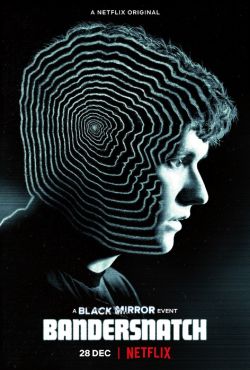
Could this be a possible direction for books to go in the future? This idea was covered recently in the Charlie Brooker’s Black Mirror episode ‘Bandersnatch’ which gave the viewer control of the storyline.

An image of Stefan Butler in profile, with his head outlined by twenty circular ripples. The poster says: A Black Mirror Event. Bandersnatch.
Source: wikipedia.org

With AR tech becoming more and more prevalent these days, could books be given immersive feel by using the technology to put you into the book? I found a great article at thebookseller.com about how AR technology is of major interest to publishing companies.

Source: thebookseller.com


Influential books

Consider the importance of books to you both personally and within a broader global sense.

First of all, think back to the earliest books you came across as a child, through your teenage years and early adulthood to where you are now. There may be half a dozen books which stick in your memory or are important to you in some way. There may be many more than that. It may be an early reading book, a particular image or short rhyme which helped you recognise letterforms. It may be the distressed metallic silver cover of a Salinger novel you read as a teenager, or the book you bought on impulse after work one day, seduced by the tactile quality of the cover.

Identify these books in your learning log, use photographs and annotation to create an illustrated list documenting the books that are important to you, for whatever reason.

Now, connect your influential books to those with a more global reach. Identify seminal works that have informed or challenged some of the areas you have identified. These may be scientific, artistic, historical, political, geographic, fictional, poetic or religious texts. For example, a book from your childhood could connect to other seminal children’s books by association, such as Heinrich Hoffmann’s Der Struwwelpeter / Shockheaded Peter (1845) or Charles Perrault or the Brothers Grimm. Likewise a book featuring dinosaurs might connect to Charles Darwin’s Origin of the Species.

When we appreciate the breadth and influence of books, we begin to appreciate the extent of a book’s potential impact. Books carry and communicate ideas; powerful messages can be contained within seemingly innocuous bound paper pages. In your learning log, create another list of books, with accompanying images and annotations, which you believe to be more globally important, but connect to your first list in some way.

This activity will feed into your first assignment, so document your ideas in your sketchbooks and learning log to refer back to later.

Books

So I’m not a big reader of books! The majority of books that I own are either recipe books or reference books. However, this exercise has made me think about which books stick out in my memory from the present right back to my childhood and I wanted to use a of a variety of book types.

Book #1 The Blue Banana

e97e9155a1a3fe1597942505577444341587343

This book sticks in my mind as one of my earliest memories and I even tried to find this for my kids when they were born but unfortunately couldn’t find a copy. I think that this really stuck with me because of the title and the thought of a blue banana obviously left a lasting impression. There were other books in the range which I remember having, but this was the one that I most vividly remember.

Book #2 The New Caxton Encyclopedia

20157482600

My parents had the full set of these including an additional GIANT atlas. I remember flicking through these as a child and my dad sending me to find stuff out and come back and tell him what I’d learned. Another, more specific memory is jumping down the stairs in my childhood home and clattering into the bookcase containing these at the bottom.

Book #3 The Adventures of Robin Hood

bancroft

This book holds mixed feelings for me. It was the first book I had to write a report on at school. It was a new school in Devon that I didn’t like! The story reminded me of my Nottinghamshire roots and I was familiar with the story and hoped that it would help me write the report. It didn’t!

Book #4 Farmhouse Kitchen

b730b6a574a0a56b01eb437a5dd61a94

This was my mum’s goto cookbook. I particularly remember the recipe for chocolate buttons, a type of soft chocolate biscuit. Maybe this was the book that started my interest in cooking and led to me being in kitchens for a large part of my life? It was probably also responsible for my sweet tooth and love of anything baked!

Book #5 Jonny My Autobiography

c205196e046f1ae9c9c4e1f044b266d6

This was a no brainer when it came to choosing my influential books. Jonny Wilkinson is a hero of mine and I read this while on holiday in the Caribbean. I was touched by the honesty of a man I held in such high regard and his vulnerabilities which I could relate to.

Book #6 Stop Stealing Sheep and find out how type works

05d79974b032dec3edb6becf59a5bc4d

This book is one of my recent discoveries and is by far the best and easiest to understand book on the use of type. It is written by the legendary German typographer Erik Spiekermann and explains type in layman’s terms and gives examples in context on every page of the book.

Wider Reach

The Blue Banana was written by Bronnie Cunningham for the Hamlyn Publishing Group. She also wrote for Puffin Books, where she compiled The Puffin Joke Book which was illustrated by Quentin Blake, who more famously illustrated most of Roald Dahl’s children’s books. Roald Dahl is one of the world’s biggest selling fiction authors with estimated book sales worldwide of between 200 and 250 million copies. It is said that Dahl’s George’s Marvellous Medicine was loosely based on Lewis Carroll’s Alice’s Adventures in Wonderland. Dahl also wrote the screenplays for the Bond film You Only Live Twice and Chitty Chitty Bang Bang, both written by Ian Fleming.

The New Caxton Encyclopedia was first produced in serial form in 1966. The name refers to William Caxton, who in 1476 brought the process of printing with movable type to England. However, the encyclopedia dates back much further to 338 BC where evidence has been found of Speusippus, Plato’s nephew, recording his uncle’s teachings. In England a version of an encyclopedia was collated by Francis Bacon in around 1620 and was “to commence a total reconstruction of sciences, arts, and all human knowledge, raised upon the proper foundations”. Francis Bacon himself is also known for allegedly penning some or all of the plays attributed to the world’s biggest selling fiction author William Shakespeare.

The Adventures of Robin Hood is about the English folklore hero Robin of Locksley, a contemporary of King Richard I who is famed for leading the 3rd Crusade to retake Jerusalem from Saladin in the 12th century. This links to the bible as this is the reason behind the crusades to spread the word of God. Shakespeare mentions Robin Hood in his plays The Two Gentlemen of Verona, As You Like It and Henry IV parts 1 and 2. Errol Flynn is probably the most well known portrayal of Robin in 1938. Prior to this he played the lead in The Charge of the Light Brigade in 1936 which was based on the poem by Alfred, Lord Tennyson in 1854. This poem was followed by the poem Last of the Light Brigade written by Rudyard Kipling 40 years later who is most famous for his book The Jungle Book.

Farmhouse Kitchen was a cookery series that was produced by Yorkshire Television and aired on the ITV network from 1971 until 1990. The earliest record of written recipes date back to Mesopotamian tablets from 1700 BC. One of the most famous ‘modern’ cookbooks made readily available to the public was Mrs Beeton’s Book of Household Management in 1857-1861 which is mentioned in A Duet, with an Occasional Chorus by Arthur Conan Doyle who is more famous for his Sherlock Holmes novels. Post-Sherlock his most well known work is probably The Lost World which was used for the title of Michael Crichton’s 1995 novel on which Jurassic Park was based, the cover of which was designed by Chip Kidd.

Jonny My Autobiography is written towards the end of Jonny Wilkinson’s career after the 2003 World Cup when he scored the winning points to win the Webb Ellis Trophy. William Webb Ellis is credited with ‘inventing’ the game of rugby by picking up the leather and pig’s bladder ball during a football match and running with it. This type of ball is mentioned in Tom Brown’s Schooldays by Thomas Hughes who also studied at Rugby School. Tom Brown’s Schooldays is credited with being a direct inspiration for J.K. Rowling’s Harry Potter series of novels.

Stop Stealing Sheep and find out how type works’ title is credited to the typographer Frederic Goudy who said “Anyone who would letterspace lowercase would steal sheep.” The phrase to ‘steal sheep’ appears in Mark Twain’s The Adventures of Tom Sawyer in which it refers to taking a risk. Twain also penned A Connecticut Yankee in King Arthur’s Court which is credited with being the foundational work in the time travel genre. However, this had been preceded by other time travel novels including The Time Machine by H.G. Wells who along with Jules Verne were called the fathers of science fiction. Prior to his literary career H.G. Wells was a biologist who followed the ethics of Charles Darwin who wrote the Origin of Species one of the fundamental science texts ever written.

Conclusion

This was a challenging exercise. As I am not a big reader it was tough to find books that meant something to me. However, once I got started I found it really interesting how 6 books from different genres could be linked with some of the most influential works from history…I went from a TV cookbook to Jurassic Park!!!! This has opened my eyes a lot more to how books are related to each other you can draw inspiration from a book’s origins and influences.

Sources

Pinterest.com

wikipedia.org

http://www.britannica.com/topic/encyclopaedia/History-of-encyclopaedias#ref307698

http://www.bl.uk/medieval-literature/articles/william-caxton-and-the-introduction-of-printing-to-england#

http://www.englishforums.com/English/StealSheep/bvlrvg/post.htm

The French Hen

Newton and Ridley, the brewers best known for their pub, The Rovers Return, are opening a cafe/wine bar nearer the city centre.

The bar is designed to appeal to younger women and sophisticated young men. The brewery has identified a gap in the market and wants to provide a ’sophisticated and relaxed’ venue for the ‘discerning’ drinker. This bar is to be called the French Hen and will be in direct competition with the cheap ‘binge drinking’ venues on the same street. The brewery is also trying to enhance its own image as a ‘respectable’ alcohol vendor.

They want you to develop some ideas for a logo, to be used:

  • on covers for the food and cocktail menus
  • in colour on the signage outside, and as a cutout for a window detail
  • on T-shirts for the staff and paper napkins
  • for one side of a beermat, the other will carry advice on sensible drinking.

There are many conventions that have been developed around the marketing of both bars and products to this age range. You need to be conscious the whole time of avoiding clichés and stereotyping.

Draw up at least three ideas to start with. Be critical of your work. Check it against the information you have here. Will it do what the client wants – and how will you know?

When you have decided which one you are happiest with, mock up the menu covers, the outside sign, the window detail, a T-shirt, paper napkin and beermat. Does it all still work?

Research

Another branding exercise, which I like. Having worked in a few bars over the years I’ve not really had much of a chance to do any branding bar a few posters.

My first port of call was to mind–map The French Hen.

975B7C1F-E0CF-42FE-971E-6FFEA6BC71F6

A few key words popped out but I needed more visual references for bar branding and chickens! So I started a Pinterest board.

Screenshot 2019-10-19 at 20.58.45

Pinterest

This threw up lots of thoughts on the branding. I particularly liked the overprint stuff (no surprise there!) and the use of a hen in the imagery. At this stage I wasn’t sure as to whether use the them in combination or separately, or whether the imagery would be literal or stylised. I then started to doodle some ideas.

8BC29066-2C4A-4C9D-AF7F-AC976AE96594

My initial sketches were around the initials FH. I seemed to be leaning towards a typographic solution to this brief. Illustration and sketching have never been my strong point and I found it difficult to put illustrative solutions down. I am much happier working digitally, so I moved into Illustrator.

The brief said that the new brand needed to appeal to young, possibly affluent professionals and away from the binge drinking culture associated with other city centre bars. So the brand needed to be on trend and pretty clean.

Screenshot 2019-10-20 at 21.38.17

The above designs were the ones I came up with digitally. My personal preference was the interlocking monogram and the hen with the type reversed out. But I’m biased! So I asked my family and peers for their opinion. They agreed on the designs that I liked as well as the orange design which they felt had a modern/retro feel. They felt that some of the typographic designs looked a bit sports bar–like and they red and blue colour only exaggerated that. It was also suggested that they were quite masculine and this didn’t fit the target demographic.

This led me to decide upon the hen logo as the direction I wanted to go with. The feedback on the colour palette told me that it needed to be more subtle and subdued. So I started with the blue hen which I had added texture to in Photoshop before importing it into Illustrator and adding the type using the font: Explorer P Sans. I also placed it on an off–white/cream background.

Screenshot 2019-10-21 at 21.10.15

I lied this, but I still wasn’t 100% happy, it needed more depth/texture. In my research I had come across the the idea of using foot/claw prints, so I added it to the background.

Screenshot 2019-10-20 at 21.37.40

Now I was getting somewhere. I then decided to follow up on the monogram idea and create one to use as part of the brand. I also had the idea of using a kind of rubber–stamp effect to overlay the design which would depict the brand’s message. I used an online tutorial for making postmarks to create the stamp.

Screenshot 2019-10-20 at 21.37.55

I then went on to create some colour variations for the brand. I also tried it with a more handwritten font: Americus Sans Aged.

Screenshot 2019-10-20 at 21.37.16

At this point I thought I was ready to start mocking things up. Then life got in the way and I had a break from my design work. When I returned to this exercise I was no longer enamoured with this design. I felt it looked quite childish and not fitting the brief. I needed to refine the idea and make it more appealing to the target audience.

I decided that a better image of a hen was required. Some of the imagery collated on my Pinterest board showed some vintage images which had some sort of overprint effect. I found an image on Shutterstock that I liked and started again.

I used the hen image I had purchased from Shutterstock as the basis for my design and added a type overprint which was similar to a postmark containing the name of the bar and it’s tagline and the date it was established in American Typewriter.

frenchhennew

This was a lot more mature and hit the brief better as a higher class of bar. I also created a black and white version of the combination mark.

Screenshot 2019-10-21 at 21.50.26

I was much happier this time around and the design seemed a lot more cohesive and gave an image of a more classy establishment. The combination mark could also be separated out into the stamp and the hen and used as separate elements across the brand. The design was to be used in one form or another on menus, beer mats, napkins, wine list and t–shirts. So I went on to mock them up. I wanted to create a mockup that contained all of the elements to display them as one consolidated image. I started with the menu, This was an area I was very familiar with due to my 25+ years in the catering industry. I mocked this up as a clipboard containing an A4 menu with the logo and a few brunch items.

frenchhenmenu

For the napkins I used the foot/claw–print pattern without a logo to subtly carry the brand through. The beer mats had just the stamp from the logo on one side with the foot/claw–print pattern and the colours reversed and on the other side was the drinkaware.com message in the opposite colours. The wine list was a bi–fold A4 with the logo wrapped around the front and back. The t–shirt was the only item that threw up an unforeseen problem. Initially I placed the logo on the lower part of the right–hand side of the t–shirt. My wife pointed out to me that this might not be visible if a staff member was wearing the t–shirt behind a bar. As a result I made the logo larger so it could be seen over the bar.

Frenchhen t-shirt

The brief also asked that the bar signage and window cutout. The signage was straight forward as the whole logo was to be used.

Frenchhensign

I wanted to do the window cutout in a gold leaf effect to convey the higher class image that the brand was trying to convey.

Screenshot 2019-10-02 at 22.10.44

Overall I think I had done the brief justice and created a brand that appealed to the target audience and conveyed the desired message.

Unfortunately I didn’t stop there! One of the ideas from my original sketches had been playing on my mind throughout the whole process and I decided to try and work it through.

The idea was to combine the words french and hen into a single wordmark, to use the whole words rather than the initials or a monogram.

As in my sketches I used Helvetica for this attempt as I didn’t want this logo to rely on imagery or anything too gimmicky. I overlaid the 2 words and then turned them into outlines. I had to do this because the stem on the R and the H were different thicknesses and the shoulders didn’t quite line up. I adjusted these so that they aligned properly by moving the points and anchors so that the letters overlaid perfectly. This was my first attempt:

Screenshot 2019-10-13 at 22.21.37

I really liked this. I’m not sure as to whether it’s my preference for typography or not, but I felt that this was the strongest of the 3 ideas to date. The feedback I received was positive, but it was highlighted that it wasn’t that obvious that there were 2 words there. I too had thought this and has already decided that hen needed underlining.

Screenshot 2019-10-14 at 20.34.16

This was better and I liked the colours as they represented the French flag. The feedback I received also said that there wasn’t enough contrast between the 2 words, so the colours needed working on.

Screenshot 2019-10-14 at 21.37.01

The feedback I received on my colour samples were that the blue/yellow showed the most contrast. As I had used those colours in the previous exercise I dismissed them. I also felt I wanted to keep the French national colours, so stuck to the red and blue.

Screenshot 2019-10-14 at 21.54.49

I used the Illustrator colour guide to find a high contrast combination of red and blue. These weren’t the an exact match to the French flag colours but they worked for the contrast and were still recognisable as the French colours.

I then went on to create a greyscale version of the logo to check it would work in black and white as well as a lettermark and a shortened version of the name which could be used to describe the bar…“Let’s go to the Hen”. I particularly liked the lettermark as it didn’t use the initials of the bar and was quite distinctive.

Frenchhenlogofrenchhennew2

I then used the same mockup as in the previous version and used the lettermark on the header for the menu and the ‘The Hen’ was used on the t-shirt and the full logo was used on the wine list. I kept the same pattern on the napkin as the previous mockup.

Frenchhen t-shirt2

For the window mockup and the bar sign I used the lettermark and added the full name to the window cutout.

Frenchhensign3Frenchhensign2

This was by far the better of the 3 designs. It’s modern, clean and trendy to appeal to the target clientele. It would be easy to reproduce without losing any of its clarity and it doesn’t have too much detail that could be lost at different scales.

Conclusion

I do enjoy branding design and logo work. This did take me out of my comfort zone a little in that I started along an illustrative route which is not my forte and struggled at first, but through research and looking at my initial sketches I eventually found the strongest idea and rather than complicating the matter the simplest design came through in the end and hopefully created an eye catching and memorable brand that would resonate with its audience. This has showed me the importance of sketching and researching fully before finalising a design. It has also shown me that maybe some time away from a design gives you the chance to look at it with fresh eyes.

Resources

Chance Housing Association

The Chance Housing Association has been set up to try and help first time buyers get onto the housing ladder and they want you to develop a brand image for their stationery.

It is important to them that the Association is seen as being different from the other local housing associations – more modern, more helpful and definitely welcoming to young people wanting to buy a house.

They want to use their logo on their letterheads and office stationery and it will also be used somewhere on the sheets that hold the property details. It also needs to be reproducible in the local newspaper and professional trade magazines.

What to do

  • Research other housing associations’ and estate agents’ styles. Look at other publications designed for a similar audience. This information should help you identify as much what you don’t want to do as what you do.
  • If this was a real job you would need to visit the housing association’s offices and website, if it has one, to see how many decisions they have already made – for example they may have painted their sign silver and dark blue and used a particular font. As the designer you may want to continue with and develop those decisions or change them.
  • Using just typography sketch up some designs. You want to come up with at least three initial ideas to show the client. In this instance you can decide which one you think works best to further develop.
  • Mock up a letterhead and business card using the logo and house brand. Look in you local newspaper and mock up an advertisement to fit in the paper. Measure the space carefully remembering to leave sufficient margins so your text isn’t cramped. Photocopy in black and white onto cheap paper – does your logo still work? Have any fine lines got lost? Are the differences between colours still discernible?
  • Show your designs to your friends and family. What is their feedback?
  • If you need to, go back and adjust your artwork. If all is well make up a presentation pack to show the client – in this instance your tutor.

Keep all your work and record the process in your learning log.

Research

This exercise really interests me as I enjoy logo design and branding.

So, first things first I started by mind-mapping.

img_0012

I also started a Pinterest board to collate brand identities of other housing association.

Pinterest

Screenshot 2019-10-07 at 20.55.16

There were lots of different housing association logos out there of varying types and styles. They featured various elements in there design including houses, keys and doors. As the brief wanted a typographic logo I wanted to use some of these symbols as part of the typographic solution. They also seemed to be predominantly sans-serif fonts used. Again, this fits in with the brief as the logo/brand is to be aimed at a younger audience and sans-serif fonts give a younger, more modern feel. Colour palettes varied, but most seemed to use just 2 colours. Some designs used acronyms for the logo and the full name as a subheading while others used the full name as the primary logo.

Design

I then moved on to sketching out some ideas. Included in the sketching I picked the colour palette that I was going to use based on what the colours represent – blue for trust and yellow for optimism, 2 virtues that are important when it comes to helping people on to the housing ladder.

img_0013

I then moved on to render what I thought were the strongest ideas digitally.

chanceideas

I presented the above 7 designs to my family and peers and explained the ideas behind my designs. The general consensus was that the top left and bottom right were the better 2 designs. Of the 2 I thought the bottom right was the better option as it was clearer and it looked ‘friendlier’ than the other design. It also lent itself for wider applications better than the other design e.g. as an icon for a mobile app. I went on to develop the logo further.

chance1

chance2

At this point I felt that I could start to use the design for the actual stationary required by the brief.

I started with the letterhead. I used a variation of the of the logo with a large blue background as the header and then a small blue shape to balance the logo in the opposite corner. The layout looked a little bare, so I decided to use the key icon as a watermark on the paper with the opacity reduced to 20%. I made 2 options with the watermark in different places.

The layout showing the majority of the key was the stronger of the 2 as in the other design the arc was too dominant.

I then went on to design the business card. Following on from the letterhead I wanted to create a card that carried through the theme. Again, I use the key icon as a watermark and used a variation of the logo without a background and the type in blue. The person’s details also reflected the blue colour. For the back of the business card I used the key icon on its own. I also created another version reversing the icon colours.

I really liked the way this turned out.

Next was the newspaper advert. While working on this exercise the thought had occurred to me that housing associations sometimes have for sale/sold signs outside their properties. I decide to mock one up.

Chancesign

This could be used as a mockup to present to the client. I then thought that I could use this as the basis for the newspaper advert. I found a suitable newspaper mockup and based the design around the smart object in the mockup. I looked at similar adverts to see what information needed to be included. I added a bar at the top and bottom of the advert on which to add the text and used the corporate colours. The type is reversed out in white and uses the same typeface as the logo to give it a cohesive look.

chance newspaper ad

I was very happy with this design, it had turned out better than I thought.

I then wanted to mockup the rest of my stationary and wanted to mock it up as if it would be presented as a mockup to a client. So I set about finding all the elements I needed to mockup my designs. I found a few extra bits to add to my mockup which included some key-rings to keep the theme of home ownership going and I branded them to match the stationary. I also added a document folder which again was branded in corporate colours.

Chance Mockup

When branding businesses they also need some sort of guidelines on how to use their new identity. This can be a simple style sheet or a book of brand guidelines. This should display logos and icons in all their variations, the fonts used, the colours used etc.. So I made up a simple style sheet to help define the brand guidelines.

Chance-Style-sheet

Conclusion

Along with the typography section of this course, this has been my favourite exercise. The feedback I have had from other people has been very positive, especially about the mockup of the final design and I think that this is because I enjoyed it so much. I have done some logo/branding work before and have drawn on that experience in this exercise. The mockups help visualize how the designs would look in the real world and help clients picture their brand in use.

Overall, I think I have answered the brief successfully and have produced a typographic logo/branding solution that appeals to the target audience and stands out from the crowd. I have learnt the importance of legibility and using fonts/colours appropriate for the audience and the business being branded and how simplicity is often the best solution when designing logos/brands.